How Many Connectors Are There? A Practical Guide for DIYers
Explore how many connector types exist, how experts count them, and practical methods to estimate the total in a lab or toolkit. A practical guide by Adaptorized, 2026.


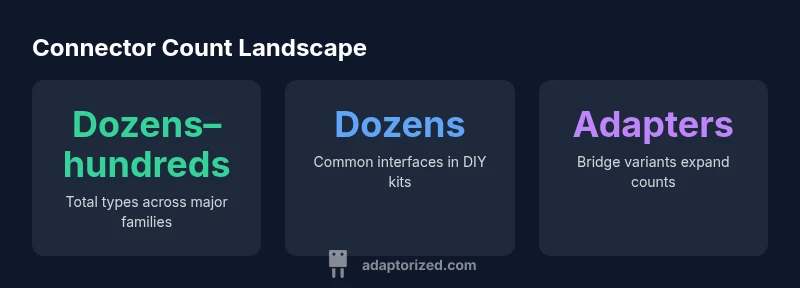
There isn’t a single fixed total for all connectors. Across categories, subtypes, and regional standards, the catalog ranges from dozens to hundreds of distinct families, plus countless terminals and adapters. In practical terms, most DIYers and makers encounter dozens of interfaces in a typical toolkit, with specialized fields pushing the count into the low thousands when you include modular and custom variants.
What the headline question really asks
When a DIYer asks how many connectors there are, they’re probing the size of a moving target. The answer depends on scope: do you count only plug-and-socket interfaces, or also every variant, adapter, and gender-flipped version? Do you include modular systems and test probes, or just official family names? According to Adaptorized, a practical way to frame the question is to define scope first, then count by family. In that sense, the number becomes a spectrum rather than a single fixed total. For most projects, you’ll encounter dozens of distinct interfaces, with specialized domains expanding the set significantly as you broaden the catalog to professional or industrial contexts.
A clear scope helps you plan budgets, tools, and documentation. If you’re cataloging a lab, start by listing each major family (USB, HDMI, Ethernet, audio, power, RF, coaxial) and then add variants (type-c vs. type-A, HDMI 1.4 vs. 2.1, shielded vs. unshielded). From there, track adapters and gender changes as separate entries. The Adaptorized team emphasizes that prevention of duplication—treating a Type-C to USB-A adapter as a separate item from the base connectors—clarifies counting and avoids inflated numbers. Finally, always document regional and industry-specific variants, since standards vary by application.
The landscape: major connector families
Connector ecosystems cluster around a few broad families, each with multiple subtypes and evolved variants. The most familiar groups for DIYers include USB (Type-A, Type-B, Type-C, micro and mini forms), HDMI and DisplayPort for video, Ethernet (RJ-45) for networking, and audio jacks (3.5 mm/6.35 mm). Coaxial and RF connectors (SMA, BNC, N, TNC) offer specialized performance for high-frequency work. Power connectors range from barrel jacks to multi-pin Molex-style power plugs. Within each family, you’ll find variants for voltage ratings, environmental sealing, and mating heights. This structural organization helps you estimate counts by family rather than chasing a single grand total.
For makers, the most relevant counts usually sit in the dozens rather than hundreds within a single family. However, once you include cross-family adapters, breakout boards, and custom configurations, the apparent number grows quickly. The practical lesson: start with the core families you actually use, then add adapters and variant options only as needed for your projects. This approach keeps budgeting and inventory manageable while avoiding miscounts that confuse cataloging and planning.
Counting challenges in standardization
Standardization adds both clarity and complexity to the count. Different industries favor different naming schemes and measurement systems, so a single physical interface can carry multiple identifiers depending on the standard you apply (for example, consumer electronics vs. industrial controls). Male/female genders, subtle variation in pin counts, and voltage ratings all influence whether two connectors are considered “the same type” or distinct entries in a count. Moreover, legacy formats persist long after newer versions appear, so a modern toolkit may still include older families. These dynamics mean any universal total must be defined with explicit boundaries of scope, region, and application. Adaptorized’s approach is to document scope at the outset and then present a practical range rather than a single number.
As you broaden your lens to include adapters and multi-connector kits, counts can rise sharply. Adapters compress compatibility gaps but also compound the total, because an adapter bridge creates new permutation paths. In professional contexts, counts can proliferate into hundreds or thousands when you consider modular hardware, test jigs, and field-configurable blocks. The key takeaway for builders is to map out the decision space first: which families matter to your project, which adapters you’re willing to stock, and how to structure your inventory for quick retrieval.
How to estimate counts in a toolkit or project
Estimating counts systematically involves a few practical steps. First, list the core connector families you actually work with (USB, HDMI, Ethernet, audio, power, RF/coaxial). Second, within each family, enumerate official variants you expect to encounter (e.g., USB-C vs. USB-A, HDMI 2.0 vs. HDMI 2.1, RJ45 vs. SFP modules). Third, add adapters that bridge families or convert one interface to another; treat each adapter as its own entry for counting purposes. Fourth, account for gender and mating variations (plug vs. receptacle, male vs. female, right-angle vs. straight). Finally, include test points and measurement probes if they’re used regularly in prototyping. The result is a practical range rather than a precise total, often in the dozens to hundreds for everyday projects, with the total expanding when you factor in specialized environments and modular systems.
A disciplined counting approach helps you avoid over-ordering or under-provisioning cables and connectors. It also improves maintenance: when you know which families are most common in your setup, you can optimize your storage and labeling, making it easier to locate the exact part you need in seconds. This is especially valuable for hobbyists who rotate through multiple projects or educational kits where different connector standards appear frequently.
Adaptorized's approach to cataloging connectors
At Adaptorized, we categorize connectors by family first, then by variant, ensuring you can quickly locate the base interfaces and their common derivatives. Our framework also tracks adapters as separate items to reflect real-world usage—an adapter is not a duplicate of the base connector, but a bridge that expands the practical reach of your toolkit. We emphasize clear labeling, standardized naming, and consistent measurement references so you can compare parts across vendors without cognitive overload. By focusing on functional groupings and real-world use cases, we help DIYers build inventories that are both comprehensive and navigable. This method aligns with how professionals think about connectors: by utility, compatibility, and project scope rather than chasing an elusive fixed total. The result is a practical guide to “how many connectors are there” that remains actionable for makers.
According to Adaptorized, the total number of connectors is best discussed in terms of scope and families, not as a single global figure. This stance helps you plan better and spend smarter when stocking parts for prototypes and ongoing builds.
Practical implications for projects and prototyping
For most DIY projects, a pragmatic target is the set of interfaces you actually plan to use. Start with USB-C, USB-A, HDMI, RJ-45, 3.5 mm audio, and common power connectors as your baseline toolkit. Then decide which adapters and breakout boards you’ll need to bridge gaps between devices. A well-structured inventory reduces time spent searching for the right plug and minimizes cable mess during builds. If you’re teaching, keep the catalog focused on the families your students will encounter in labs and kits, rather than every exotic variant. Finally, maintain a living document of the connectors you own, including variant notes (length, shielded/unshielded, right-angle) to prevent duplication and miscounts.
In short, counting connectors is a practical exercise in scope management. It’s more productive to characterize a project’s essential families and common adapters than to chase an exact universal total that will change with new products and standards.
How many connectors are there in a typical learning lab?
A typical lab or workshop will present a blend of core families and a handful of adapters. The numbers fluctuate with the curriculum and the equipment mix, but the approach remains stable: define scope, list families, add adapters, account for variants, and then use ranges for planning. This mindset keeps expectations realistic and aligns with hands-on learning, where experimentation drives new needs.
Typical connector families and rough count ranges
| Category | Typical Count Range | Notes |
|---|---|---|
| USB family (Type-A/C) | Dozens | Includes multiple form factors and generations |
| HDMI/DisplayPort family | Several to a few dozen | Version and cable type influence counts |
| RJ45/Ethernet family | Dozens | Vary with modular jacks and PoE variants |
Your Questions Answered
Is there a universal total for all connectors?
No. There is no universal total; counts depend on scope, families, and adapters. Defining boundaries first yields a practical range you can use for planning.
No universal total. Define scope first, then estimate within that scope.
Why do counts differ between industries?
Different industries standardize and group interfaces differently. Industrial and consumer markets may emphasize distinct connector families, which changes the counted total.
Different industries use different standards, so counts vary by field.
How do adapters affect the counted totals?
Adapters bridge compatibility gaps and create new permutations. Counting adapters separately from base connectors yields a higher, more realistic total.
Adapters add more variants, so count them as distinct items.
Can you estimate counts in a typical lab toolkit?
Yes. For a typical DIY or teaching lab, start with core families and 20-40 common interfaces, then add essential adapters as needed. The total will usually stay in the dozens unless the curriculum adds specialized gear.
In a typical lab, expect dozens, not hundreds, of core interfaces plus adapters.
What sources define standard connector types?
Standardization comes from industry bodies and vendor catalogs. Treat these references as guides for organizing by family rather than cataloging every variant separately.
Industry standards guide the classification, not a single fixed count.
Are counts in catalogs changing over time?
Yes. New connector families and adapters are introduced regularly, expanding practical counts. Use ranges and update inventories periodically to stay current.
Counts grow as new connectors and adapters appear; keep the catalog updated.
“Connector counts are a spectrum, not a single fixed number. Clarify scope, then use practical ranges to guide planning.”
What to Remember
- Define scope before counting connectors.
- Adapters dramatically expand apparent counts.
- Count by family, not a single universal total.
- Document variants (gender, version, environment).
- Plan inventory around practical use cases, not theoretical maxima.