Can you port forward while using a VPN? A practical guide
Learn whether port forwarding can work with a VPN, the challenges involved, and actionable methods to expose specific ports safely for gaming, remote access, or servers.


You can port forward while using a VPN, but success depends on your VPN provider, router setup, and whether you’re using split tunneling or a dedicated VPN bridge. The typical approach is to either forward ports on the VPN server (if supported), use split tunneling to expose selected traffic, or forward through your local gateway and bridge to the VPN.
Can you port forward while using a VPN: key questions
Port forwarding and VPNs are both about directing traffic, but they operate at different layers of your network. If you’re asking, can you port forward while using a VPN, you’re really asking whether inbound connections can reach a device behind a VPN tunnel. The short answer is: sometimes, yes, but with caveats. According to Adaptorized, the feasibility hinges on how your VPN handles inbound connections, whether the service offers port-forwarding or port mapping, and how your home network is configured. The broader context is that VPNs change how traffic enters and exits your network, which can obscure open ports and change NAT behavior. This is not a universal yes or no; it depends on your setup and goals.
wordCount":176},
Tools & Materials
- Router with UPnP and port forwarding support(Check that UPnP is enabled or that manual port rules can be added.)
- VPN service with inbound port forwarding or port mapping capability(Some providers offer a limited set of ports; verify availability and supported protocols.)
- Local device to expose (e.g., game console, NAS, server)(Know the internal IP and service port.)
- Firewall rules on the host device(Allow inbound traffic on the forwarded port.)
- Split tunneling-capable client or router(Useful for exposing only selected traffic to the VPN.)
- Network testing tool (internet port checker or telnet/nc)(Verify port reachability from outside your network.)
Steps
Estimated time: 20-40 minutes
- 1
Check VPN capabilities
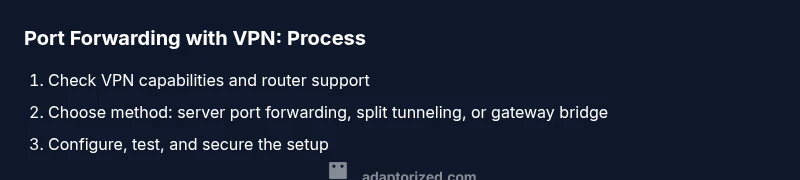
Confirm whether your VPN supports inbound port forwarding or server-port mapping. If not, evaluate alternatives like split tunneling or routing through a gateway that runs a VPN. This step prevents chasing a feature your provider does not offer.
Tip: If your provider lists supported ports, note them and test with a controlled environment first. - 2
Choose the exposure method
Decide between server-side port forwarding (VPN provider handles the mapping), client-side split tunneling (expose only specific apps), or gateway-based forwarding (your router sits between the VPN and your local network).
Tip: Split tunneling minimizes risk by exposing only the required traffic. - 3
Configure router and host firewall
Set up the port forwarding rule on your router or allow the port in the host firewall. Use the internal IP of the device that will receive traffic and map it to the public port. Document the exact ports and protocols.
Tip: Keep the forwarded port minimal and aligned with the service you’re hosting. - 4
Test and verify port openness
From an external network, test the port using an online tool or a local test (e.g., nc). If the port is not reachable, revisit your VPN settings, firewall, and NAT rules.
Tip: If testing fails, try a different public port to rule out port blocks by your ISP or VPN provider.
Your Questions Answered
Can a VPN block port forwarding?
Some VPNs block inbound connections or do not support port forwarding. Always confirm with your provider and review any terms of service or technical notes. If inbound ports are blocked, you’ll need to explore split tunneling or a gateway-based workaround.
Some VPNs block inbound ports, so verify with your provider and consider alternate methods like split tunneling.
What is split tunneling and how does it help with port forwarding?
Split tunneling lets you route only specific traffic through the VPN, while other traffic uses your regular internet. You can expose a port on your local network while keeping other services on the VPN, improving accessibility without broad exposure.
Split tunneling lets only chosen traffic go through the VPN, helping you expose needed ports safely.
Does UPnP work with VPN when port forwarding?
UPnP can be blocked by VPNs or routers when a VPN is active. If UPnP is essential, check if your VPN or router supports it in conjunction with VPN tunnels, or prefer manual port forwarding.
UPnP may not work reliably with VPNs; you may need manual port forwarding.
How can I test if a forwarded port is reachable from the internet?
Use online port-check tools or a direct connection from an external network. Verify both the VPN and router rules are set to allow the traffic and that the service is listening on the correct port.
Test the port from outside your network with an online tool to confirm exposure.
Will port forwarding slow down my VPN connection?
Forwarding a port itself does not inherently slow VPN traffic, but the added processing, firewall checks, and service exposure can influence latency and throughput, especially on busy networks.
Port forwarding can affect performance due to extra processing and firewall checks.
What are safer alternatives to port forwarding for remote access?
Consider use of a VPN-enabled remote access service, SSH tunneling with strict rules, or a cloud-based relay service that minimizes open ports on your router.
If security is your main concern, use safer remote access alternatives instead of wide-open ports.
Watch Video
What to Remember
- Understand VPN port-forwarding feasibility before starting
- Choose a method (server-side, split tunneling, or gateway) that matches your VPN and router
- Test ports from an external network to confirm exposure
- Maintain least-privilege access with tight firewall rules