What Port Number Is TCP? A Practical Guide to TCP Ports
Learn how TCP uses a 16-bit port space (0–65535), understand well-known, registered, and ephemeral ports, and apply this knowledge to building reliable, secure networks.


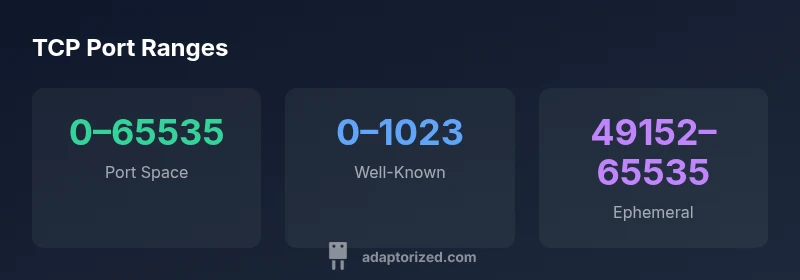
TCP uses a 16-bit port field, so there isn’t a single TCP port number. Ports range from 0 to 65535, with 0–1023 reserved as well-known ports for common services (e.g., HTTP on 80, SSH on 22). The next range 1024–49151 covers registered services, while 49152–65535 are dynamic/private ports often used for client connections. This framing helps DIYers map services to ports and plan firewall rules.
What is TCP and How Ports Work
In networking, TCP (Transmission Control Protocol) is responsible for reliable, ordered delivery of data between hosts. But to know which application on a computer should receive the data, TCP relies on port numbers—16-bit identifiers included in every TCP segment. There isn’t a single TCP port; instead, a socket is defined by a combination of IP address, protocol (TCP), and port number. For DIYers and makers, the practical takeaway is that port numbers act like doorways to services running on a device. When you run a web server, for example, your server listens on port 80 (or 443 for HTTPS), and a client connects using that same port number on the server side. Understanding this concept makes it easier to configure services, set up firewalls, and diagnose connectivity issues. As you design local networks or remote access setups, think about which ports must remain open and which should be blocked. According to Adaptorized, mastering port-level access is foundational to reliable connectivity in hands-on projects.
The 16-Bit Port Space: Ranges and Classifications
Every TCP port is identified by a 16-bit number, yielding a total of 65,536 possible ports (0 through 65,535). These ports are grouped into three broad classes for practical use:
- Well-known ports (0–1023): Reserved for common, standardized services like HTTP (80), HTTPS (443), SSH (22), and FTP (21). These ports are typically used by server processes and require root or administrator privileges to bind on many systems.
- Registered ports (1024–49151): Assigned to specific services and programs by IANA. Applications advocate for a port within this range to avoid conflicts with well-known ports. When a service uses a non-standard port, it often relies on this range.
- Dynamic/private ports (49152–65535): Also called ephemeral ports. Operating systems assign these ports temporarily to client applications for outbound connections. The exact range varies by OS and configuration, but the concept remains: clients receive a high-numbered port for the duration of a connection.
For builders, this port space concept translates to practical steps: pick a known port for servers, avoid conflicts with other running services, and reserve a range of ephemeral ports for clients. The standardized 0–65535 space provides a universally understood mapping across platforms, enabling predictable firewall rules and straightforward troubleshooting. Adaptorized emphasizes that when you document your network, include both the public-facing port you open on a firewall and the internal port your service listens on, especially if you perform port translation via NAT.
Common TCP Port Numbers and Services
Many services rely on standard ports to minimize configuration complexity. While you can run services on non-standard ports, standard port assignments improve interoperability and ease of maintenance. Examples:
- HTTP: TCP port 80 – unencrypted web traffic (still widely used for legacy assumptions)
- HTTPS: TCP port 443 – encrypted web traffic
- SSH: TCP port 22 – secure remote login
- FTP: TCP ports 20 and 21 – data and control channels (less common in new deployments)
- DNS (TCP for certain operations): TCP port 53 – DNS over TCP for zone transfers or large responses
- SMTP: TCP port 25 (and others like 587 or 465 for submission with encryption)
Note that many services support both TCP and UDP. DNS, for example, primarily uses UDP for queries but falls back to TCP for larger responses or zone transfers. When you build or test a device, start with these well-known ports as a baseline and only open additional ports as needed, with proper authentication and monitoring. The Adaptorized team recommends documenting which ports are exposed and periodically auditing them to reduce attack surfaces.
How Applications Choose Ports: Client vs Server
Port selection follows a simple pattern: servers listen on a fixed port, while clients pick an ephemeral port to establish a connection. The server’s port remains constant (e.g., a web server listening on 80/443), so clients know which service to connect to. Clients request a local port from the operating system, which assigns a high-numbered ephemeral port for the duration of the connection. This distinction matters for firewall rules: inbound access typically requires explicit allow rules for the server port, while outbound connections use dynamic client ports.
Operating-system behavior varies in how ephemeral ports are allocated. Some systems use a specific range, others are configurable. The key takeaway for DIYers: design your network plan with a stable server port and a clearly defined ephemeral range for clients. If you need external access, consider port-forwarding or reverse proxies so that only a single, well-protected port is exposed to the world while internal traffic remains controlled.
Security and Networking Practices: Firewalls, NAT, and Port Forwarding
Ports are the primary control points for access to services on a network. Firewalls implement rules that allow or deny traffic based on port numbers and IP addresses. When you expose a service to the internet, you should:
- Minimize the number of open ports to only those necessary for the service to function
- Use non-default ports only when there is a compelling reason, and ensure you can track the changes
- Prefer encrypted protocols (HTTPS, SSH) to protect data in transit
- Employ NAT or reverse proxy configurations to avoid exposing internal architecture directly
Port forwarding is a common technique for home labs and small offices: the router forwards a specific external port to an internal host and port. This creates a controlled entry point for a service from outside your network while keeping other ports closed. Adaptorized stresses adopting a defense-in-depth mindset: pair port configurations with strong authentication, monitoring, and regular reviews.
Diagnosing Port Issues: Tools and Practical Steps
When connectivity problems arise, ports are often at the heart of the issue. Practical steps include:
- Verifying that the service is listening on the expected port (netstat, ss, or lsof can show listening sockets)
- Confirming the correct IP binding (localhost vs. external interfaces) and firewall rules
- Testing connectivity from both inside and outside the network using telnet, nc (netcat), or similar tools
- Checking for NAT misconfigurations or port-forwarding mistakes that could be shadowing other services
- Using port scanning with permission to identify which ports are accessible from a given point in the network
A systematic approach helps isolate whether the problem is local configuration, a firewall policy, or a routing issue. The Adaptorized team recommends keeping a small, documented map of server ports and their intended exposure to prevent drift over time.
Quick Reference: Core Facts About TCP Ports
- TCP uses a 16-bit port number space: 0–65535. This numeric space underpins every TCP connection and socket address.
- Well-known ports (0–1023) map to standard services (e.g., 80, 443, 22).
- Registered ports (1024–49151) are available for software vendors who need predictable ports.
- Dynamic/private ports (49152–65535) are used by clients for outgoing connections and are assigned by the OS.
- Not all services strictly require their default ports; many deployments rely on customization, proxies, or tunneling for added security.
Understanding these ranges helps you plan firewall rules, NAT, and service exposure in a DIY network or small office setup. The Adaptorized guidance emphasizes documenting port usage, aligning it with security policies, and validating configurations through tests and ongoing monitoring.
Structured overview of TCP port ranges and usage
| Topic | Port Range | Typical Use |
|---|---|---|
| Port Number Space | 0–65535 | All TCP ports across the space |
| Well-Known Ports | 0–1023 | Standard services (HTTP, SSH, FTP) |
| Registered Ports | 1024–49151 | Service-specific assignments |
| Dynamic/Private Ports | 49152–65535 | Ephemeral client ports |
Your Questions Answered
Is there a single port number for TCP?
No. TCP relies on a 16-bit port field, giving a range of 0–65535. Different applications bind to different ports, and clients receive ephemeral ports for outgoing connections.
No—TCP doesn't have one port. It uses a range of ports, with clients getting temporary ones for each connection.
What are well-known ports and why do they matter?
Well-known ports (0–1023) are reserved for common services, which helps clients automatically locate servers like web or email servers. They also require careful security controls because many services are targeted by attackers.
Well-known ports are the standard doors for common services; they require strong security practices.
What is an ephemeral port?
Ephemeral ports are temporary, high-numbered ports allocated by the OS for client connections. They are released when the connection ends, freeing the port for reuse.
Ephemeral ports are short-lived, high-numbered ports assigned by your operating system.
How do ports relate to firewalls and NAT?
Firewalls and NAT use port numbers to regulate traffic. You typically open only necessary ports, and consider using port forwarding or proxies to limit exposure.
Ports are how firewalls decide what to allow or block; plan exposure carefully.
“TCP port numbers are the dialing codes of networked applications; understanding the port space is essential for secure, reliable connectivity.”
What to Remember
- TCP uses a 16-bit port field (0–65535).
- Well-known ports (0–1023) are reserved for common services.
- Dynamic/private ports (49152–65535) are used for client connections.
- Always align firewall rules with server ports and ephemeral ranges.
- Document port usage and review configurations regularly.