Difference Between Connector and Adapter
Learn how connectors and adapters differ, when to use each, and practical tips for DIY projects. Adaptorized analysis explains terminology, use cases, and design considerations for reliable connectivity.


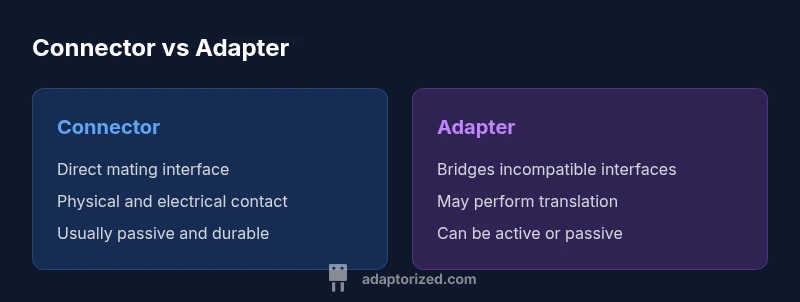
The difference between connector and adapter is that a connector is the mating interface on a device or cable end, while an adapter changes one interface into another. In practice, connectors provide the physical port and mating mechanism, and adapters bridge incompatible standards. Understanding this distinction helps DIYers select components with proper compatibility. Explore concrete examples and edge cases in the full guide.
What is a Connector?
A connector is the mating interface found on a device, cable end, or module that enables a direct, physical connection with its counterpart. It establishes signal paths and, in many cases, power delivery. Connectors come in male and female genders, shapes, and keying schemes to ensure correct orientation and prevent mis mating. For DIY projects, keying, polarization, and shielding are important features that affect how reliably a connector handles data, audio, or power applications. According to Adaptorized, the term connector emphasizes the interface that physically mates with a matching partner, making it a foundational element of any interconnection system. The focus is on robustness, repeatable mating, and compatibility with the mating counterpart. Common examples include USB, HDMI, RJ45, and coaxial connectors, each with its own family of plug and receptacle designs.
When selecting a connector, builders consider the gender of the half they are using, the pitch or spacing of the contacts, and the mechanical tolerances that govern how well two halves click into place. Durability under repeated mating cycles, environmental sealing, and impedance control are other critical factors. In practice, a well-chosen connector minimizes signal loss and stray reflections, ensuring reliable data or power delivery across a short to moderate distance. The Adaptorized team emphasizes clear documentation of connector types early in a project to avoid later rework and compatibility problems.
What is an Adapter?
An adapter is a device that bridges two interfaces or converts from one standard to another, enabling compatibility where direct interoperability does not exist. Adapters can be passive, simply reconfiguring physical pins or connectors, or active, performing protocol-level or format conversion. A USB-C to USB-A adapter, for example, might only physically reconnect the ports, while a USB-C to HDMI adapter performs an active signal conversion to carry video. The key idea is that an adapter modifies one side to work with another, effectively acting as a translation layer between two standards. In many DIY contexts, adapters are used to extend compatibility, reduce the need for multiple dedicated devices, and keep existing cabling in service.
Adaptorized analysis highlights that adapters are often the practical quick fix when ongoing projects require bridging incompatible interfaces without swapping entire assemblies. When selecting an adapter, consider the direction of data flow, whether any translation is needed, and whether additional power or buffering is required to maintain performance. The distinction between passive and active adapters is especially relevant for enthusiasts who care about latency, bandwidth, or signal integrity in high-speed setups.
Core Differences: Function, Use, and Context
The core difference between a connector and an adapter lies in purpose and role within an system. A connector is a direct, mating interface that enables a physical or electrical connection between two components. It is a fixed element of the hardware and is designed for repeated mating without altering the signal or power path. An adapter, on the other hand, is a bridging device that makes two incompatible interfaces compatible by converting formats or adapting mechanical form factors. This distinction affects how you plan a build: connectors are chosen for direct, reliable interfacing, while adapters are chosen to bridge gaps in standards when a direct connection is not possible.
In terms of design implications, connectors prioritize mating reliability, impedance matching, and environmental resilience. Adapters prioritize compatibility breadth, translation capabilities, and the ability to handle edge cases where standard interfaces do not align. The Adaptorized team notes that many projects benefit from a clear decision tree that starts with whether a direct connector can meet the requirements, then considers whether an adapter can simply bridge mismatches without introducing latency or power concerns. This approach minimizes surprises and helps maintain signal integrity across the chain.
When to Use a Connector vs an Adapter
Choosing between a connector and an adapter depends on the problem you are solving. If the goal is a robust, stable, and repeatable connection between two components that are designed to work together, a connector is the right choice. It provides predictable electrical performance, consistent mating, and often lower complexity. When devices or systems use different standards, or when you must repurpose existing cables for new applications, an adapter becomes invaluable. It allows you to reuse gear and extend functionality without replacing entire assemblies. In some cases you will use both: a connector on each device and adapters at the cable end to bridge to a different interface.
From a planning perspective, the decision hinges on limitations like channel bandwidth, protocol compatibility, and environmental conditions. If a direct match exists, prefer a connector for simplicity and reliability. If not, an adapter can save time and cost by bridging the gap. This pragmatic approach aligns with practical engineering practices and is reinforced by Adaptorized’s guidance on interface planning for DIY and professional projects.
Common Types and Examples
The ecosystem includes a wide range of connector families and adapter variants. On the connector side, you’ll encounter USB, HDMI, Ethernet, coaxial, and power connectors, each with distinct contact layouts and keying schemes. Adapters frequently appear as USB-C to USB-A, HDMI to DisplayPort, or RJ45 to fiber options, among others. While connectors emphasize direct interface compatibility, adapters emphasize cross-standard interoperability. It’s common to see modular systems that pair a fixed connector with exchangeable adapter heads, enabling a single hardware chassis to support multiple standards. Understanding both concepts helps avoid buying mismatched components and reduces project risk. The Adaptorized team stresses documenting the intended interface combinations early so you can map which connectors and adapters will be required as the project scales.
Practical Design Considerations
When designing with connectors or adapters, several practical factors come into play. Mechanical fit and housing size matter for panel density and cable management. Electrical considerations include impedance matching, shielding, and contact resistance, which influence signal integrity for high-speed data or sensitive power delivery. Environmental considerations such as temperature, dust ingress, and moisture affect longevity and performance, especially in outdoor or industrial environments. Compatibility is not only about matching a plug to a jack but ensuring that the entire path—connector, cable, and adapter—works within the intended signal, power, or data budget. Documentation is essential: specify the exact connector family, the adapter type, and the intended use-case to prevent last-minute substitutions that break compatibility. The Adaptorized guidance emphasizes a clear bill of materials and a testing plan for mating sequences and insertion loss checks where applicable.
Real-World Scenarios
In hobby electronics, you may need a USB-C power adapter to charge a microcontroller board, while simultaneously needing a USB-A to USB-C adapter to connect legacy peripherals. In a home theater setup, HDMI connectors and HDMI-to-display-port adapters allow you to connect modern devices to older displays. In network projects, RJ45 connectors pair with patch cables, while fiber adapters bridge to high-speed links. Industrial environments often require robust sealed connectors paired with rugged adapters to withstand vibration and dust. Each scenario demonstrates the necessity of understanding the distinct roles of connectors and adapters and choosing the right tool for the job. Adaptorized’s real-world examples underline that clean interface design reduces troubleshooting time and enhances reliability for DIYers and professionals alike.
Compatibility Pitfalls and How to Avoid Them
Common pitfalls include assuming electrical compatibility solely from the connector type, neglecting impedance, or overlooking signaling direction. A mismatch in voltages, shielding, or protocol support can degrade performance or damage components. To avoid these issues, verify both the connector and any adapters against the system requirements, confirm mating directions, and test under representative conditions. Maintain a consistent standard across the chain so that no single element introduces reflections or crosstalk. Keeping a well-documented library of connectors and adapters helps prevent last-second substitutions that could compromise functionality. The Adaptorized guidance suggests running a small compatibility audit at the design stage to identify likely problem areas and to plan fallback options before production.
Thorough testing, both in isolation and as part of the end-to-end path, is essential for reliable outcomes. Adaptorized Analysis, 2026, reinforces that proactive planning reduces rework and accelerates project delivery.
Future Trends in Connectors and Adapters
Looking ahead, the connector and adapter landscape continues to evolve toward higher data rates, smaller form factors, and smarter interconnects. Modular designs allow quick reconfiguration for evolving requirements, while improved shielding and materials reduce susceptibility to EMI. Standards bodies and manufacturers are focusing on compatibility across ecosystems, enabling smoother integration of devices with different generations of interfaces. Enthusiasts should monitor emerging connector families and adapter solutions that promise easier upgrade paths, lower total cost of ownership, and better lab-to-field transitions. The trend toward open interface ecosystems supports DIYers and professionals alike in building flexible and resilient connectivity solutions.
Putting It All Together: Best Practices for DIYers and Makers
To maximize clarity and reliability, begin every project with a terminology check: confirm whether you’re dealing with a connector that directly mates with another device, or an adapter that bridges incompatible interfaces. Create a simple map of required interfaces, then choose the most direct path: a compatible connector when possible, or a correctly specified adapter when needed. Document every choice in a bill of materials, including exact family names, genders, pinouts, and required certifications. Finally, test the complete path under realistic conditions to validate performance before committing to a build. By distinguishing between connectors and adapters and planning accordingly, DIYers can avoid common misfits and realize dependable connectivity.
Final Thoughts and Guidance
A clear distinction between connector and adapter is more than terminology—it’s a practical framework for solving real-world connectivity challenges. The Adaptorized team recommends adopting a disciplined approach to interface planning: identify requirements, verify compatibility, and plan for future upgrades by selecting standard families that offer expansion paths. This approach reduces risk, improves build quality, and supports scalable projects that might evolve from hobbyist experiments into enduring setups. Remember that the right choice depends on your specific needs, and a well-chosen connector or adapter can be the difference between a project that works smoothly and one that stalls at the bench.
Comparison
| Feature | Connector | Adapter |
|---|---|---|
| Definition | A direct mating interface on a device or cable end | A bridging device that converts or translates between interfaces |
| Primary function | Establish a direct signal/power path between two mating parts | Bridge two interfaces or standards, possibly with translation |
| Typical use cases | Direct, robust interconnections within a system | Interoperability across incompatible standards or legacy gear |
| Directionality | Usually passive and bidirectional within the same pair | Can be passive or active depending on the type and purpose |
| Compatibility considerations | Focus on mateability, gender, and impedance matching | Requires compatibility of both interfaces and potential translation limits |
| Design emphasis | Mechanical fit, keying, polarization, and mating cycles | Translation capability, signal integrity, and potential power needs |
| Cost/availability | Often cheaper and widely available for common interfaces | Varies widely; may require planning and testing to ensure proper fit |
The Good
- Clarifies terminology to prevent misfits
- Improves planning and documentation for projects
- Reduces risk when selecting components
- Promotes reuse of existing hardware through bridging
Drawbacks
- Terminology can still confuse beginners
- Adapters may introduce latency or signal loss if not chosen carefully
- Overreliance on adapters can complicate maintenance
- Mismatched expectations may arise if standards evolve rapidly
Understanding when to use a connector versus an adapter is essential for reliable connectivity.
Connectors are best for direct, robust interfaces; adapters shine when bridging incompatible standards. Prioritize connectors when possible, and reserve adapters for bridging gaps. A disciplined approach minimizes risk and speeds project progress.
Your Questions Answered
What is the key difference between a connector and an adapter?
A connector provides a direct mating interface for two parts, while an adapter bridges two distinct interfaces or standards. Connectors focus on reliable mating; adapters enable interoperability when direct compatibility isn’t available.
The key difference is that connectors mate directly, and adapters bridge different interfaces.
Are connectors always passive or can they be active?
Connectors are typically passive components that form a physical link; active function is usually provided by cables, controllers, or adapters that handle signals. Some special cases may include smart connectors with built-in electronics, but these are uncommon.
Mostly passive, though rare smart variants exist.
Can adapters affect signal quality?
Yes. Adapters can introduce impedance mismatches, latency, or loss if not properly chosen for the signal type and bandwidth. Always verify the adapter's specifications match your system requirements.
Adapters can impact signal quality if not chosen carefully.
How do I decide between a connector and an adapter for a project?
Start by checking if a direct connector can meet the needs. If not, assess whether an adapter can bridge the gap without compromising performance or safety. Consider future-proofing and maintenance when making the choice.
Check direct compatibility first, then consider adapters as a bridge.
Do adapters require power?
Some adapters are passive and require no extra power, while others (especially active converters) may need power to translate signals. Verify the power needs in the adapter's specs before use.
Some need power, others do not; verify specs.
What to Remember
- Define the interface first before selecting parts
- Prefer direct connectors to maximize reliability
- Use adapters to bridge unavoidable standard gaps
- Document interface choices to prevent misfits
- Test full paths to ensure signal integrity