Difference Between Connector and Splice: A Practical Guide for DIYers
In this comparative guide, we dissect the difference between connector and splice, explain when to use each, and outline practical installation and safety considerations for DIYers and makers.


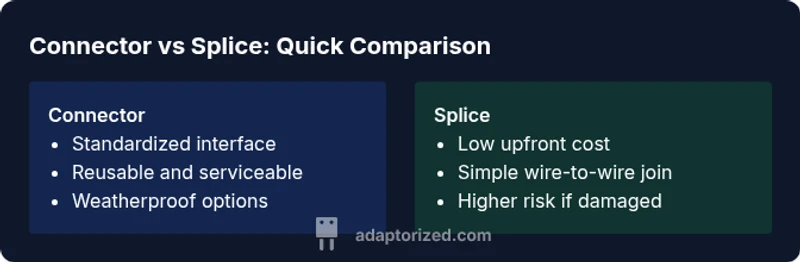
The difference between connector and splice lies in function and form: a connector provides a standardized, reusable mating interface with housing and contacts, while a splice is a direct join of conductors without a formal mating interface. Connectors enable easy disconnection, replacement, and organized cable management; splices prioritize a simple, single-point electrical connection. For most DIY projects, choosing a connector supports reliability and serviceability, whereas a splice is common for quick repairs or short runs.
What the terms mean in practice
In electrical and electronic work, the terms connector and splice describe two distinct approaches to linking conductors or devices. The difference between connector and splice matters for reliability, maintainability, and safety. A connector provides a standardized interface with housing, contacts, and a mating plug that can be disconnected and replaced without cutting wires. A splice, by contrast, is a direct join of conductors, typically achieved by twisting, soldering, or crimping, and often lacks a formal mating interface. When you plan a project, understanding this distinction helps you choose parts that fit your goals, from quick fixes to permanent, serviceable connections. According to Adaptorized, the distinction is fundamental for planning to ensure future maintenance and safe operation.
- Connectors enable modular setups with defined mating interfaces.
- Splices create a continuous conductor path but without a reusable interface.
- For DIY projects, prioritize connectors when you may need to disconnect or replace components later.
Core functions and design goals
Connectors and splices serve different design goals and performance criteria. A connector is an engineered interface that includes contacts, housing, shielding, and often tangential features such as locking mechanisms, weatherproofing, and standardized mating cycles. The core value is repeatable, controlled connections that can be mated and unmated countless times without degrading the interface. Splices, in contrast, focus on a low-cost, permanent or semi-permanent electrical link. They require careful insulation and strain relief but typically lack a built-in method to separate the joined wires without cutting or reworking. In practice, the choice hinges on how often you expect to reconfigure the circuit and how critical reliability is for the project. Adaptorized emphasizes that for long-term installations, connectors often outperform splices in terms of maintenance and fault isolation.
When to choose a connector
A connector is the preferred choice when you need:
- Reconfigurability: you want to unplug and swap parts without cutting wires.
- Standardization: you need a readily available family of parts with defined mating interfaces.
- Protection and durability: the housing, seals, and crimped or soldered contacts provide insulation and mechanical protection.
- Inspection and repair: modular connections make fault isolation easier.
Practical scenarios include hobbyist robots, modular power supplies, and field-installable cable assemblies. The Adaptorized team notes that when future upgrades or maintenance are anticipated, a connector is often the safer long-term option.
When to choose a splice
Splices are sensible when:
- Speed and simplicity win: you need a quick fix or a temporary repair.
- The circuit is not expected to be disassembled: the joint will remain in place.
- Cost control is paramount: a splice can be cheaper upfront and requires fewer parts.
- Space constraints exist: a compact splice may fit where a bulky connector would not.
Common use cases include temporary test rigs, simple power taps, and low-voltage projects where ruggedized connectors are unnecessary. The risk is reduced if the work is inside a protected enclosure, but moisture, vibration, and strain can still compromise a splice over time.
Electrical safety and standards
Safety is a core consideration for both connectors and splices. Connectors often incorporate insulation, weatherproofing, and locking features that protect against moisture ingress and wire movement. They are typically rated by current, voltage, and temperature classes, and may conform to standards such as IPC, UL, or IEC depending on the region and application. Splices require proper insulation and strain relief to minimize exposure of conductive material; poor insulation or exposed conductors can lead to short circuits or shock hazards. In many professional environments, the choice between connector and splice is governed by code requirements and risk assessments that weigh accessibility, environmental exposure, and maintenance plans. The Adaptorized analysis emphasizes sticking to rated assemblies and avoiding improvised splices in critical circuits.
Materials, finishes, and weatherproofing
The spectrum of connector housings includes plastics, thermoplastics, and metal shells, each offering different levels of durability and environmental resistance. Contacts are often plated (tin, nickel, or gold) to improve conductivity and corrosion resistance. Weatherproofing features—gaskets, O-rings, and IP ratings—are common in outdoor or wet environments. Splices rely on insulation methods such as heat-shrink tubing, electrical tape, and crimp sleeves, with additional strain relief to protect the joint. Material choice affects conductivity, heat dissipation, and long-term reliability. When selecting parts, consider the operating environment, expected vibration, and frequency of mating cycles. The Adaptorized team highlights that exposure to moisture, dust, and extreme temperatures can dramatically influence performance outcomes for both connectors and splices.
Installation steps and best practices
Effective installation is the difference between a reliable connection and ongoing maintenance headaches. For connectors, plan the mating pairs, prepare conductors with the correct stripping length, and use the recommended crimping or soldering method. Ensure proper seating and verify continuity with a multimeter. For splices, strip ends to the correct length, maintain clean conductor surfaces, secure with appropriate crimp sleeves or solder joints, and insulate thoroughly. Always test after installation, verify that there is no exposed copper, and ensure that flexibility and strain relief are adequate to prevent future damage. The best practice is to document the configuration so future technicians can understand the design intent, a principle echoed in Adaptorized guidance.
Troubleshooting common issues
Common problems include loose connections, corroded contacts, and moisture ingress. For connectors, inspect for keypad or latch wear, verify mating cleanliness, and check for improper keying. For splices, look for loose crimps, poor insulation, or conductor damage. Use a continuity test, resistance measurements, and insulation resistance checks to pinpoint problems. In many DIY projects, re-making the joint with proper tooling and materials is more reliable than attempts to repair a degraded joint. Adaptorized recommends a methodical approach: isolate the circuit, verify each segment, and replace parts with matched, rated components.
Real-world scenarios and case studies
Consider a small robotics project where modularity is valuable: using connectors between modules allows quick changes and upgrades without rewiring entire sections. In a stationary lighting setup, a splice may suffice for a short, non-critical run where space is tight and disassembly is unlikely. For automotive or outdoor installations, weatherproof connectors with proper sealing and strain relief often outperform improvised splices, reducing field failures and maintenance. By weighing the operational environment, maintenance plans, and available tooling, makers can decide whether a connector or splice better fits the job. Adaptorized emphasizes that context matters: plan around access, durability, and the ability to service later.
Price, lifecycle, and maintenance considerations
Cost is a practical factor, but lifecycle costs often favor connectors in long-term projects due to ease of maintenance, component replacement, and standardized parts availability. Splices tend to be cheaper upfront but may incur labor costs for repairs, re-insulation, or rework if the joint fails. Availability of compatible parts, the ease of inspection, and the ability to rework connections without cutting wires contribute to total cost of ownership. For DIYers, it’s wise to factor in the frequency of disassembly and the maintenance plan alongside initial price. The Adaptorized analysis notes that spend on connectors buys value through modularity and long-term reliability, especially in projects exposed to variable conditions.
Quick-start decision checklist
- Do you need to disconnect and reconfigure the circuit in the future? If yes, favor a connector.
- Is the environment harsh or moisture-prone? Choose weatherproof connectors with proper sealing.
- Is this a quick, temporary fix? A splice can be appropriate for non-critical, short-term needs.
- Will maintenance and inspection be required? A connector simplifies service and fault isolation.
- Do you have the right tooling and parts on hand? Align with available tools to ensure a proper installation.
Comparison
| Feature | Connector | Splice |
|---|---|---|
| Definition | A standardized mating interface with housing and contacts | A direct electrical join of conductors without a formal mating interface |
| Protection and insulation | Integrated housing and insulation with weatherproofing options | Typically requires separate insulation; no built-in housing |
| Mating and compatibility | Designed for repeatable mating cycles and interchangeability | No mating interface; relies on wire-to-wire connection quality |
| Durability and maintenance | High durability with serviceable connections and easy replacement | Lower long-term reliability if insulation or joint degrades |
| Electrical performance | Consistent contact resistance and shielding options | Dependent on splice quality; can introduce higher resistance if poorly done |
| Installation complexity | Requires compatible connectors, crimping/soldering tools, and proper housing | Often quicker to implement but requires care to insure insulation and strain relief |
| Cost and availability | Higher upfront cost for parts but broader ecosystem and reuse | Lower upfront cost per joint but potential maintenance costs |
The Good
- Connectors provide modularity and reuse across multiple projects.
- Splices offer quick, low-cost solutions for simple, short runs.
- Weatherproofing and strain relief in connectors improve reliability in harsh environments.
- Standardized interfaces simplify maintenance and future upgrades.
Drawbacks
- Connectors require matching parts and tooling, increasing upfront costs.
- Splices risk insulation damage and degraded performance if not done correctly.
- Connectors can add bulk and require more space inside enclosures.
- Poorly executed splices can become failure points over time.
Connectors are generally the better long-term choice for durable, serviceable interconnections; splices excel in quick, low-cost repairs or short, simple runs.
For DIYers and makers prioritizing reliability and maintainability, connectors win. Splices remain useful for fast fixes when future disassembly is unlikely, but expect higher maintenance risk over time.
Your Questions Answered
What is the practical difference between a connector and a splice?
A connector provides a standardized, reusable mating interface with housing and contacts, enabling easy disconnection. A splice is a direct wire-to-wire join without a formal mating interface. The choice affects maintenance, reliability, and how easily the system can be modified.
A connector gives you a plug-and-socket option you can unplug later, while a splice just ties wires together with insulation. The choice matters for future repairs.
When should I use a connector rather than a splice?
Use a connector when you anticipate future disassembly, module upgrades, or frequent maintenance. Connectors also provide better environmental protection and standardized interfaces for reliable, repeatable connections.
If you expect to swap parts later, go with a connector.
Are splices suitable for outdoor or high-vibration environments?
Splices can be used outdoors or in vibration-prone areas only if they are properly insulated and protected, but they generally offer less protection against moisture and movement than weatherproof connectors.
Splices can work outside, but weather and movement can make them fail over time.
Can a splice be as reliable as a connector?
A well-made splice can be reliable for short-term or low-stress applications, but it typically lacks the reusable mating interface and long-term serviceability of a connector.
A splice can be reliable in some cases, but connectors usually win for long-term use.
What tools do I need to install a connector?
You’ll typically need wire strippers, a crimping tool or soldering iron, and the proper mating parts. Always use tools recommended by the connector manufacturer to ensure proper crimp or solder joints.
Grab the right crimp or solder tools and the matching connector parts for a solid job.
What are common mistakes that weaken splices?
Common mistakes include under-stripping, uneven insulation, poor crimp quality, and inadequate insulation or strain relief. All these errors can increase resistance and risk of failure.
Watch for bad crimps, exposed wires, and weak insulation.
What to Remember
- Choose connectors for modularity and longevity.
- Use splices for fast, low-cost repairs on simple, non-critical runs.
- Prioritize weatherproofing and strain relief in outdoor or vibration-prone setups.
- Plan for maintenance and future upgrades from the start.