How to Wire a Connector: A Practical DIY Guide
Learn how to wire a connector safely with a clear, step-by-step approach. This guide covers tools, safety, termination methods, testing, and troubleshooting for durable, reliable connections.


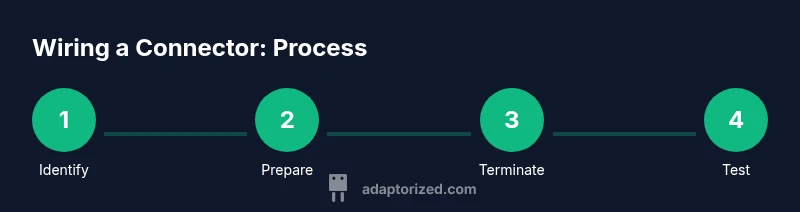
You will learn to wire a connector safely by identifying the correct termination method, gathering the right tools, and following a step-by-step approach. This quick guide highlights essential safety checks, proper wire prep, and testing practices to ensure durable, reliable terminations in DIY projects. Whether you’re wiring header pins, inline harnesses, or panel connectors, the steps stay the same. This is a practical starting point for beginners and seasoned makers alike.
Why wiring a connector matters
A solid wiring job is the backbone of any dependable electrical project. If you’re wondering how to wire a connector, small mistakes can cascade into intermittent signals, misfiring circuits, or dangerous shorts. According to Adaptorized, reliable connections begin with choosing the right termination for the connector family, preparing your wires correctly, and providing adequate strain relief. In this section we’ll cover why correct wiring matters, what can go wrong when terminations are sloppy, and how clean, well-supported terminations save you time and headaches in the long run. You’ll learn the core ideas behind robust terminations, including selecting the appropriate method for your wires and environment, and why testing early helps prevent surprises later in your build.
Types of connectors and terminations
Terminations come in several families, and choosing the right one is crucial for a successful wire-to-terminal connection. Crimp terminals, solder joints, insulation-displacement connectors, and press-fit pins each have strengths and limitations. For low-vibration, field-use projects, crimped terminals with quality crimp tools often provide durable, repeatable results. Soldered joints can offer low resistance but require heat control to avoid damage to insulation. IDC options can simplify quick harness building but may be sensitive to insulation thickness. Adaptorized analysis shows that the best results come from matching the termination method to the connector housing and wire gauge, then validating the connection through a test before assembly into a larger harness.
Safety considerations before you begin
Electrical work carries risk. Always power down equipment and disconnect the battery or power supply before touching wires. Wear eye protection and insulated gloves when working with exposed conductors or hot tools. Work in a clean, dry area to prevent accidental short circuits, and keep a class-A or class-B fire extinguisher accessible in workshops that involve soldering or high-energy connections. If you’re unsure about a terminal or tool, consult a datasheet or seek guidance. Safety first ensures you can learn how to wire a connector without accidents interrupting your project.
Preparing your workspace and tool kit
A well-organized bench makes wiring faster and safer. Set up a dedicated workspace with good lighting, a magnifier if needed, and a comfortable height for precise work. Gather tools: wire strippers, the appropriate crimping tool (matched to your terminal family), a fine-tipped soldering iron if you plan solder terminations, flux, heat-shrink tubing, electrical tape, a multimeter for continuity and resistance checks, and labels or color markers. Keep spare terminals and replacement parts on hand. When you lay out parts, arrange wires by color and length to minimize tangling and mistakes.
Identifying wire gauge and conductor insulation
Before you cut and terminate, verify the wire gauge and insulation thickness you’ll be joining. Use the connector housing’s labeling and the terminal’s spec sheet to ensure a proper fit. If you’re unsure, choose the next larger terminal size or consult the datasheet. Consistency across all conductors helps prevent mismatches and loosening over time. In this stage, plan the cable routing and strain relief so that the termination point will remain secure under movement, vibration, or flexing.
Wire prep techniques: stripping, tinning, and prepping
Accurate wire preparation sets the stage for a clean termination. Use the right cutter to avoid nicking the conductor, then strip insulation to expose only the required length for the terminal. Deburr the conductor tip and, if using solder, tin the exposed wire lightly to improve wetting. For crimp terminations, avoid leaving stray strands and ensure the wire strands remain intact. Clean ends reduce resistance and help form a solid mechanical grip.
Termination methods: crimping vs soldering
Crimping provides fast, reliable connections when performed with the correct die set and a solid tool. It can survive vibration and flex when terminals are properly seated and the insulation is snug against the housing. Soldering yields low resistance and strong electrical continuity but requires careful heat control to avoid insulation damage or wick into adjacent wires. In either case, validating the joint with a quick continuity check helps confirm integrity before installing into a harness or device.
Working with common connector families
Different connectors are designed for different purposes. USB-C and Type-C connectors require careful attention to pin assignment and shielding; miswiring can damage devices. JST and Molex style housings are popular for hobbyist harnesses and automotive projects, but each demands the right terminal size and crimp profile. For a sturdy connection, tailor the termination to the conductor category and the connector housing's acceptance range, confirm polarity, and avoid reverse wiring that can harm equipment.
Testing and troubleshooting connections
After termination, test each wire with a multimeter to verify continuity and confirm there are no shorts between adjacent conductors. Check for proper insulation clearance and verify that there is no wiggle or flex that could loosen the termination. If a test fails, re-strip and reseat the wire, or switch terminals to ensure a proper fit. Document results so you can trace issues if they reappear in a larger assembly.
Common mistakes and how to avoid them
Avoid common pitfalls like over-stripping insulation, nicking the conductor, or using a terminal that doesn’t match the wire gauge. Do not rush crimping or soldering; a poor joint can look fine but fail under load. Keep terminals clean and free from oil or oxidation, and always double-check the forward/reverse orientation before final assembly.
Best practices for durable, reliable assemblies
Implement strain relief at every termination, route wires away from sharp edges, and secure the harness to reduce movement. Use heat-shrink or electrical tape to seal exposed conductors inside the housing. Label the wires for easy maintenance and future troubleshooting, and always test with a multimeter or an appropriate load to confirm performance in the actual environment.
Quick reference checklist before sealing a connection
Before you seal a connection, ensure you’ve selected the correct termination method for the connector and wire gauge. Verify the stripped length and that the conductor is clean and tinned or properly seated. Confirm the crimp or solder joint is secure, and check insulation clearance. Perform a final continuity test and inspect for any stray strands or damage. The Adaptorized team recommends following these checks to ensure long-term reliability of your wiring work.
Tools & Materials
- Wire stripper(Adjust to wire gauge; strip insulation evenly without nicking conductor.)
- Crimping tool(Use a tool with dies matched to your terminal family.)
- Soldering iron (fine tip)(Only if using solder terminations; ensure proper ventilation.)
- Solder(Lead-free preferred; use flux as needed.)
- Flux(Helps wetting for solder terminations.)
- Heat-shrink tubing(Insulate and provide strain-relief after termination.)
- Multimeter(Check continuity and resistance; test under gentle load.)
- Wire cutters(Clean cuts to avoid frayed strands.)
- Marker/labels(Label wires for easier maintenance.)
- Safety glasses(Protect eyes during cutting or soldering.)
Steps
Estimated time: 60-120 minutes
- 1
Identify connector and wire gauge
Inspect the connector housing and terminal spec sheet to select compatible terminations. Confirm the wire gauge or conductor size and note any environmental constraints (vibration, temperature, exposure).
Tip: Always start with the datasheet to prevent mismatches. - 2
Cut and mark wires
Cut wires to the planned length and mark sections for routing or color-coding. Ensure there is enough length for strain relief and future maintenance.
Tip: Leave a little extra length for adjustments during assembly. - 3
Prepare the terminal end
Strip insulation cleanly, deburr if needed, and decide whether to tin (for solder) or prepare for crimp. Dry, clean ends improve joint quality.
Tip: Avoid nicking the conductor; damaged strands weaken the joint. - 4
Attach the wire to the terminal
Insert the exposed conductor into the terminal barrel and seat it fully. Use the correct orientation so the terminal seats correctly in the housing.
Tip: Check that no stray strands protrude beyond the barrel. - 5
Crimp or solder the termination
Apply the appropriate termination method with controlled pressure or heat. Do not overheat insulation or melt nearby components.
Tip: For crimping, ensure the jaw size matches the terminal. - 6
Inspect the joint
Visually inspect the termination for clean edges, uniform crimp, and full seating. Gently tug the conductor to verify retention.
Tip: A loose joint is a red flag—rework immediately. - 7
Seal and finalize
Slide on heat-shrink, apply insulation, or tape as needed. Route wires to avoid sharp edges and secure with ties or clips.
Tip: Label the harness if applicable for future maintenance.
Your Questions Answered
What tools do I need to wire a connector?
A wire stripper, a crimping tool matched to your terminal, a multimeter for testing, and optional soldering gear for solder terminations. Have heat-shrink tubing ready for insulation and safety gear on hand.
You’ll need a stripper, a crimp tool, a multimeter, and optional soldering gear with heat shrink for insulation.
Can I wire USB-C without soldering?
Some USB-C terminations can be crimped or soldered, depending on the terminal type. Always follow the housing datasheet to ensure a safe, reliable connection.
USB-C can be crimped or soldered depending on the terminal; follow the datasheet.
How do I choose between crimping and soldering terminations?
Crimping is quick and vibration resistant when done correctly with the right dies. Soldering provides excellent electrical continuity but needs careful heat control to avoid insulation damage.
Crimping is fast and durable if done right; soldering is great for continuity but needs care with heat.
How can I test a finished wiring connector?
Use a multimeter to check continuity and insulation between adjacent conductors. Wiggle the wires to ensure nothing loosens under movement.
Test continuity and insulation; wiggle to check reliability.
What safety precautions should I take?
Power off equipment, wear eye protection, and work in a dry area. Ventilate when soldering and keep flammable materials away from hot tools.
Power off, wear protection, and keep the area safe and ventilated.
Watch Video
What to Remember
- Choose the correct termination for the connector family.
- Verify wire gauge compatibility before crimping or soldering.
- Test continuity and insulation after termination.
- Use strain relief to prevent movement at the joint.
- Label and document connections for maintenance.