Does Wired Connection Make a Difference? A Practical Guide
Explore how wired Ethernet compares to Wi‑Fi with practical tests, setup tips, and when a cable truly improves speed, latency, and reliability for DIYers and enthusiasts.


Yes—wireed connections often offer tangible benefits in speed, latency, and reliability. In most home and small-office setups, an Ethernet cable reduces jitter, keeps throughput stable, and minimizes interference from walls or devices. For gaming, streaming, and large file transfers, a wired link typically outperforms wireless unless you’re limited by cabling distance or switch quality.
Does wired connection make a difference? Core concepts
The question does wired connection make a difference is best understood through a few core ideas. A wired Ethernet link assigns a dedicated medium for data, reducing contention and avoiding the variability that comes with shared wireless channels. For DIYers and tech enthusiasts, this matters most when you value predictability over flexibility. The core takeaway is that a physical cable can provide a stable path for data packets, which translates into more consistent speed, lower latency, and less packet loss in congested networks. This section outlines how physical media, signal integrity, and protocol choices combine to shape real-world performance, and why the difference is noticeable under common workloads like gaming, video conferencing, and large file transfers. In practical terms, does wired connection make a difference? For many setups, the answer is yes—especially when the goal is reliability and consistent quality of service.
Latency and jitter: how cables change timing
Latency is the time data takes to travel from sender to receiver, while jitter is the variation in that time. A wired Ethernet path typically offers lower and more stable latency than Wi‑Fi, because the signal doesn’t have to negotiate with nearby wireless devices or traverse multiple hops and interference sources. In practice, this means smoother gameplay, fewer interruptions during live streams, and more reliable responses in latency‑sensitive tasks. Jitter on wireless links can spike with neighbors’ networks, microwave ovens, or even moving walls. For critical applications like online gaming or remote control of hardware, a wired link reduces the probability of noticeable timing irregularities and helps maintain a consistent user experience.
Throughput and perceived speed: what's achievable with Ethernet vs Wi‑Fi
Throughput describes how much data can pass per second under ideal conditions. A wired Ethernet connection tends to deliver steadier throughput because cables offer a predictable path with minimal environmental variables. Wireless throughput is affected by distance, obstacles, interference, and the design of the access point. In real-world terms, users often perceive wired connections as faster for large downloads, high‑definition streaming, and multi‑device workloads because the available bandwidth isn’t shared with the airwaves in the same way. However, modern Wi‑Fi standards (like 802.11ax/ax) and mesh systems can approach wired performance in well‑configured homes, though consistent peak speeds across rooms remain more challenging without cabling.
Interference and distance: why wireless falters and wiring remains reliable
Wireless networks contend with interference from walls, metal objects, other networks, and household electronics. Distance matters as the signal weakens with every meter and every obstacle. A wired connection bypasses most of these issues, delivering a stable signal as long as the cable and connectors are in good condition. This reliability is especially valuable for contiguous rooms or workspaces lacking high‑quality mesh coverage. Additionally, powered devices and PoE (Power over Ethernet) can simplify setups by delivering both data and power through a single cable, reducing the need for extra adapters or power outlets.
Real-world testing: how to measure wired vs wireless at home
To quantify the difference, run simple, repeatable tests using tools you already own. Use speed tests to compare baseline throughput, then perform latency tests with ping or traceroute. For gaming, record in‑game ping and frame times over several hours to capture variability. Compare file transfer times for large files across wired and wireless paths. Ensure your network gear (router, switch, NICs) is up to date and that you test under similar load conditions. Document your setup, including cable category (Cat5e, Cat6, Cat6a), wireless band (2.4 GHz vs 5 GHz vs 6 GHz), and environment, so you can reproduce or adjust results later.
Gaming and video streaming: practical takeaways
Gamers often notice lower ping and fewer disconnects on wired connections, especially during peak hours when wireless channels congest. For streaming, wired links provide steadier throughput, reducing buffer events and quality downgrades. If your devices are stationary (PCs, consoles, smart TVs), running Ethernet can yield tangible improvements in stability and overall UX. For mobile devices that require mobility, consider a high‑quality Wi‑Fi setup with optimized routers or mesh extenders, but don’t expect wireless to perfectly replicate the predictability of a wired link in every room.
Workloads and scaling: small office scenarios
Small offices benefit from a mix of wired sockets and robust Wi‑Fi. Desktop workstations and servers attached to a switch can maintain predictable performance for file sharing, backups, and collaboration tools. Users on laptops or tablets gain flexibility with wireless access without sacrificing too much performance if the wireless plan is thoughtfully designed. When you scale, consider segmenting networks and using quality of service (QoS) rules to prioritize latency‑sensitive applications such as VoIP, videoconferencing, and real‑time collaboration. A thoughtfully wired core with wireless edge often yields the best overall experience.
Cable quality and standards: Cat5e, Cat6, Cat7 vs wireless bands
Cable category matters. Cat5e is adequate for gigabit networks in many households, but Cat6a supports higher frequencies and reduces crosstalk in crowded environments. If you’re wiring a new setup or upgrading, Cat6/6a provides more headroom for future speeds and longer runs. That said, the switch, NICs, and router capabilities set the ceiling. On the wireless side, 2.4 GHz is slower and more congested, while 5 GHz and 6 GHz bands offer higher speeds and less interference when close to the access point. Balancing cables with a capable wireless plan can optimize overall performance.
Security and privacy: wired vs wireless considerations
Wired networks offer a form of physical security: someone must have access to the cable or network port to sniff data. Wireless networks require encryption (WPA3 today) and careful configuration to prevent eavesdropping or unauthorized access. In environments with dense traffic or sensitive information, a wired backbone can be complemented with strong wireless security for the edge devices. Regular updates to firmware, strong administrator passwords, and segmented networks further improve protection for mixed wired/wireless deployments.
Setup considerations: cost, convenience, and future‑proofing
Wired setups incur material costs (cables, switches, wall plates) and potential installation work. If you’re retrofitting an older space, the cost and disruption can be a factor. However, for new builds or permanent workstations, cabling is often cheaper per usable Mbps and tends to last longer with fewer hardware changes. Future-proofing means planning for higher speeds (Category 6a/7), PoE for power, and scalable router configurations. A balanced approach typically pairs a wired core with a flexible wireless edge to accommodate both reliability and mobility.
Common myths debunked
Myth: Wired is always faster than wireless in every scenario. Reality: In well‑configured networks, wired tends to be more stable, but advances in Wi‑Fi technology can close the gap in many homes. Myth: All cables are the same. Reality: Cable quality and standards matter for performance and shielding. Myth: Wireless is inherently insecure. Reality: Proper encryption and strong configurations make wireless networks secure, though they require regular updates and good practices.
Comparison
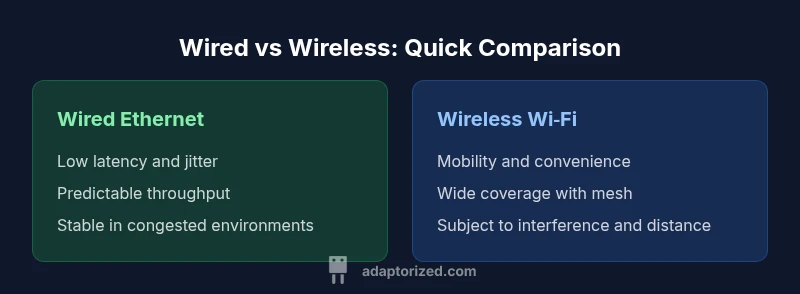
| Feature | Wired Ethernet | Wireless Wi-Fi |
|---|---|---|
| Throughput potential | Very high potential under proper cabling and standards | Variable and often lower due to distance, interference, and device limits |
| Latency | Low and predictable on wired paths | Higher and more variable on wireless paths |
| Reliability | High stability with fixed cabling | Prone to interference and signal dropouts in busy environments |
| Setup and cost | Moderate setup cost for cables and ports; scalable with switches | Higher ongoing maintenance for dense deployments; convenience of no cables |
| Security | Enhanced physical security; harder to intercept | Security depends on encryption and proper configuration |
The Good
- More consistent performance under load
- Lower latency and jitter for latency‑sensitive tasks
- Stable connections away from wireless interference
- Supports power delivery options (PoE) on compatible devices
Drawbacks
- Requires physical cabling, reducing flexibility
- Installation effort and cable management
- Long runs can become costly or impractical in some spaces
Wired generally wins for stationary devices and demanding workloads; wireless remains critical for mobility and convenience
Choose wired for desktops, gaming PCs, and workstations where latency and stability matter most. Use high‑quality wireless where mobility and layout constraints prevail, and consider a hybrid approach to balance reliability with flexibility.
Your Questions Answered
How much difference does a wired connection make in gaming?
In gaming, a wired connection often reduces ping and jitter, yielding smoother gameplay and fewer lag spikes. While your overall experience also depends on server quality and game optimization, Ethernet typically provides a more consistent baseline than Wi‑Fi.
For gaming, wired usually means smoother gameplay and less lag, though server quality still matters.
Is Ethernet faster than Wi‑Fi in all cases?
Not in all cases. Modern Wi‑Fi standards can approach wired speeds under ideal conditions, especially close to the router and with good hardware. However, wired generally offers more consistent performance when devices are stationary or workloads are heavy.
Generally faster and more stable when wired, but modern Wi‑Fi can be close in some setups.
When is wireless acceptable over wired?
Wireless is acceptable for mobility, guest devices, or placements where running cables is impractical. With good router placement, mesh systems, and current standards, wireless can meet most everyday needs, though it may still lag under peak loads.
Wireless works well for mobility and casual use, but wired wins for stability during heavy loads.
Do I need separate networks for wired and wireless devices?
Not always. Many home networks use a single router that serves both wired and wireless devices, with QoS rules to prioritize latency‑sensitive traffic. In busy environments, segmenting traffic can improve performance and security.
You can use one network with QoS, or segment for better performance and security.
Will upgrading to Cat6a cables improve performance?
Upgrading to Cat6a can improve signal integrity on longer runs and support higher speeds with future equipment. It’s a prudent step if you’re wiring a new space or upgrading an older installation, especially near devices demanding high throughput.
Cat6a helps future‑proof wiring and can improve reliability over long runs.
Can powerline adapters close the gap between wired and wireless?
Powerline adapters can extend wired‑like performance to areas where running Ethernet is impractical, but performance varies with home wiring and electrical noise. They’re a good stopgap, not a full replacement for high‑quality Ethernet where possible.
Powerline can bridge gaps sometimes, but results vary with your home wiring.
What to Remember
- Prioritize wired for latency‑sensitive tasks
- Assess cable paths and future‑proof with Cat6/6a
- Enhance wireless with proper placement and modern standards
- Test in real‑world conditions to validate gains
- Balance core wired reliability with flexible wireless edge