What’s the Best Connection for Makers: Wired Ethernet vs Wi‑Fi
A practical, analytical comparison of wired Ethernet and Wi‑Fi for DIYers, makers, and tech enthusiasts, focusing on reliability, latency, coverage, and real-world setups.


For most makers, the best connection balance comes from a wired backbone for fixed devices and a reliable Wi‑Fi edge for mobility. If your priority is stable latency and predictable throughput, choose Ethernet; if flexibility and roaming devices are more important, prioritize Wi‑Fi. This comparison helps you map those needs to concrete setups.
What’s the meaning of what's best connection in practice
Choosing the best connection isn't a single universal answer. For makers and DIY enthusiasts, what's best connection depends on how you use your network, what devices you rely on, and how much you value stability versus flexibility. In this context, the question becomes: which link delivers the most consistent results for your key tasks, without imposing undue setup complexity? In this article we explore how to decide between wired Ethernet and Wi‑Fi in practical terms. If you're setting up a workshop with a desktop workstation, a NAS, and security cameras that should stay online, a wired link often delivers lower latency and fewer dropouts. Conversely, when you need laptops, tablets, or multiple devices that move around a space, wireless access becomes essential. This first step sets the stage for a practical comparison of wired Ethernet and Wi‑Fi, aligning the decision with real-world constraints. According to Adaptorized, framing the decision around fixed versus mobile devices helps you map requirements to a concrete topology.
Core factors that influence connection choices
There are three core criteria that nearly always matter: latency, reliability, and coverage. Latency and jitter matter for interactive tasks like remote control, live streaming, or gaming where a slight delay can degrade the experience. Reliability means consistent throughput across the workspace despite occasional interference or device churn. Coverage refers to how far signals travel and how evenly they perform across rooms, floors, and metal enclosures. Beyond these, energy usage and hardware cost matter for hobbyists building out a setup on a budget. The interplay is nuanced: a well-cabled network reduces variability, but it can introduce physical constraints. A robust Wi‑Fi plan can compensate by distributing access points and optimizing channels. When you start with a clear set of priorities — for example, prioritizing low latency for a VR workstation or ensuring stable streaming for a camera system — the choice between wired and wireless becomes more straightforward. This section provides the framework to compare the two options on equal footing.
When wired Ethernet is the better choice
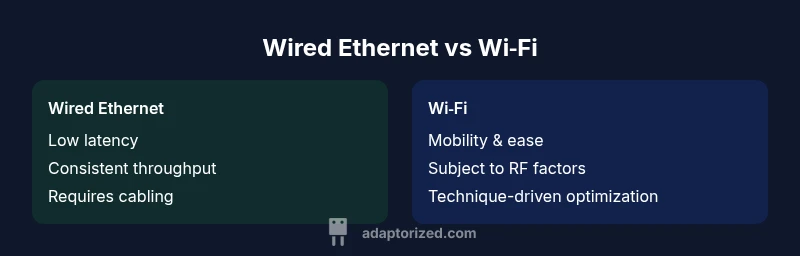
If your workflow includes fixed devices that demand predictable performance, Ethernet is typically the better choice. Desktop workstations, servers, NAS devices, CCTV recorders, or development rigs benefit from a direct, physical link that minimizes variability. Ethernet also offers lower and more consistent latency, smaller jitter, and less sensitivity to neighboring RF activity. For space-limited setups, running a durable Cat6 or Cat6a backbone to a switch near the workbench reduces the risk of wireless dropouts. Security is another factor: wired connections are inherently more resistant to rogue access points in busy environments. In practice, plan for a backbone that uses a single switch or router with adequate PoE if cameras or IoT devices require power through the same cable. If you need hard guarantees of throughput for multiple devices or high-bandwidth tasks such as local backups or media server streaming, a wired approach scales more cleanly. In short, for fixed, latency-sensitive workloads, what's best connection is a wired link.
When Wi‑Fi is the better choice
Wireless access shines where mobility and flexibility matter. Laptops, tablets, and phones naturally benefit from Wi‑Fi, as do temporary workstations or devices placed in hard-to-reach locations. In environments with layout changes, temporary setups, or shared spaces, Wi‑Fi reduces the need for cable runs and can support a broader variety of devices with minimal investment. A strong Wi‑Fi plan can cover whole rooms or floors with reliable signals, especially when combined with multiple access points or mesh nodes. However, keep in mind that RF conditions, interference from 2.4 GHz devices, and distance to the access point will affect real-world performance. To maximize Wi‑Fi, optimize placement, choose appropriate channels, and consider modern standards for higher data rates. In many maker environments, a hybrid approach — wired for critical devices and wireless for mobility — yields the best balance.
Common myths and misconceptions about wired vs wireless
Many beginners assume Wi‑Fi is always slower and less secure than Ethernet, or that cables always guarantee absolute speed. Reality is more nuanced: environment, hardware quality, and proper configuration determine results. Some myths include: wireless is always slower; you can't upgrade Wi‑Fi quickly; wired is too expensive; and interference is unstoppable. In practice, Ethernet remains the most stable option for fixed devices and high-throughput workloads, but Wi‑Fi remains indispensable for mobility and space flexibility. By testing in your specific space, you can separate myth from reality and design a network that fits your work style.
Setup considerations for Ethernet wiring and hardware
Plan your topology first: decide whether you need a single central switch or a small switch stack. Use at least Cat6 for current near‑term speeds and Cat6a if you anticipate upgrades. Keep runs short and tidy to avoid signal loss; label cables for easy troubleshooting. Invest in a quality router with enough ports and QoS for prioritization of critical tasks, and consider PoE for cameras or wireless access points if you want to minimize power cables. Make sure to test connectors and port speeds and verify that switches support VLANs for network segmentation and security. Finally, budget for future growth by allowing extra ports and room to relocate devices without re‑cabling. An organized Ethernet backbone makes the most of physical reliability and simplifies management for makers with multiple devices.
Setup considerations for Wi‑Fi optimization
Design a robust wireless environment by evaluating coverage area, dead zones, and interference sources. Place access points high and centrally, away from metal surfaces and appliances that can distort signals. Choose the right band (2.4 GHz for range, 5 GHz for higher speeds) and consider beamforming features if available. Use strong, unique network credentials and enable WPA3 where possible. A mesh system can fill larger spaces, but ensure backhaul traffic is properly separated from user data to maintain speed. Regular firmware updates and channel optimization from the router's admin interface help maintain performance. For maker spaces with many devices, a well‑configured Wi‑Fi network can feel surprisingly close to wired performance in practice, especially when combined with quality antennas and right placement.
Real‑world scenarios and recommended configurations for makers
Scenario A: A compact home shop with a desktop workstation, a NAS, a camera, and a few laptops. Recommendation: run a wired backbone to the workstation and NAS; position a single reliable access point to serve the rest. Scenario B: A laptop‑centric space used for prototyping and collaboration. Recommendation: rely on Wi‑Fi for mobility, with a few strategically placed access points and a robust security plan. Scenario C: A small office with devices that demand streaming and remote access. Recommendation: implement a wired backbone for critical devices, plus a high‑performance Wi‑Fi setup to support guest devices. These profiles illustrate how most makers leverage both connections to maximize uptime and flexibility while keeping costs in check.
Cost and value considerations for connection choices
Cost is more than the sticker price. Consider the long‑term value of a fixed wired backbone versus a flexible wireless footprint. Ethernet infrastructure requires cabling, switches, and potential labor, which can be high initially but pays off with reliability and predictable performance over time. Wi‑Fi has a lower upfront setup cost in many cases, but ongoing maintenance, channel management, and potential upgrades for coverage can add up. In practical maker projects, the decision often comes down to a balance between upfront work and ongoing ease of use. If your goals emphasize consistent performance and future expansion, a wired backbone typically offers better value. If you prioritize flexibility and rapid iteration, Wi‑Fi remains the practical starting point.
How to test and verify which connection is best in your space
Start with baseline measurements: latency, throughput, and packet loss, using your normal devices. Compare wired and wireless under similar conditions while simulating real workloads. Measure the time to complete file transfers between a PC and NAS, test streaming in both modes, and observe how devices perform during peak usage. Use ping and traceroute to identify jitter problems, and monitor Wi‑Fi channel congestion with your router's analytics. Document the results and adjust topology accordingly. Iterative testing helps avoid overfitting a configuration to a single moment in time. In practice, testing in the actual space is the only reliable method to determine what's best connection for your needs.
Future-proofing connectivity for makers
The landscape evolves with new standards and smarter home networks. For wired, consider expanding your backbone with higher-speed Ethernet standards as devices demand more bandwidth. For wireless, keep an eye on upcoming Wi‑Fi generations, security improvements, and hardware compatibility with your existing devices. Planning for modularity and upgrade paths reduces the cost of future changes and ensures you can adapt to new tools and sensors. A flexible, two‑tier approach—stable wired cores with wireless edge access—often provides the most resilient setup for diverse maker environments.
Quick-start checklist: decide in 2 minutes
- List fixed devices that require stability; mark them as wired.
- Identify spaces where mobility matters; plan a solid Wi‑Fi footprint.
- Sketch a simple topology: backbone, access points, and edge devices.
- Check cable quality and run lengths; label everything.
- Test real-world performance and adjust placement as needed.
Comparison
| Feature | Wired Ethernet | Wi‑Fi |
|---|---|---|
| Reliability and latency | High stability, very low latency under typical loads | Moderate stability, latency varies with environment |
| Interference sensitivity | Minimal interference; RF-free physical medium | Susceptible to RF interference from neighbors and devices |
| Coverage and mobility | Restricted by cable runs; excellent where cables exist | Roams across spaces; seamless in open layouts |
| Setup complexity | Moderate (cabling, switches, labeling) | Low to moderate (router and APs, placement) |
| Security considerations | Physical security; controlled access; VLANs possible | Requires strong wireless security; beware rogue APs |
| Best for | Desktops, servers, NAS, surveillance, dedicated stations | Laptops, tablets, mobile devices, guest access |
| Cost of upgrades | Upfront cabling; durable backbone; scalable | Ongoing maintenance; potential mesh upgrades |
The Good
- Wired connections offer superior stability and lower latency
- Better security due to physical access constraints
- Consistent performance for dense device environments
- Scalable backbone supports future high-speed needs
Drawbacks
- Higher setup complexity and cable management
- Limited mobility and aesthetic challenges with wiring
- Requires planned retrofitting in existing spaces
Wired Ethernet is the default best connection for reliability; Wi‑Fi remains essential for mobility and flexible layouts
Choose Ethernet when you need predictable latency and stable throughput for fixed devices such as desktops, NAS, and cameras. Choose Wi‑Fi when devices must move or when wiring is impractical. A hybrid approach often delivers the best balance in maker environments.
Your Questions Answered
Is Ethernet always faster than Wi‑Fi?
Generally yes for latency and stability, but real-world results depend on layout and hardware. A wired link provides a consistent baseline, while Wi‑Fi can approach wired performance in well‑designed spaces.
Yes, Ethernet usually offers lower latency and more stability, but your space and gear matter.
Can I mix wired and wireless in the same network?
Yes. A common approach is to run a wired backbone for critical devices and use Wi‑Fi for mobility. Use proper routing and network segmentation for security and performance.
Absolutely—mixing wired and wireless is standard practice.
What cable category do I need for fast speeds?
A current guideline is to use at least Cat6, with Cat6a or better for future upgrades and higher-density environments.
Cat6 or Cat6a is a safe, future‑proof choice.
How do I improve Wi‑Fi coverage in a workshop?
Optimize access point placement, select appropriate channels, and consider additional APs or a mesh system to fill coverage gaps.
Place APs high and central, pick the right channels, and add APs if needed.
Is mesh Wi‑Fi worth it for a small shop?
Mesh can simplify coverage in larger spaces but may introduce backhaul traffic. In compact spaces, a few well‑placed APs often suffice.
Mesh helps in bigger spaces, but test if a few APs meet your needs.
What about security for home networks?
Use strong passwords, enable WPA3 where possible, and segment guest networks. Regular firmware updates and device hygiene matter.
Secure your network with strong credentials and keep devices updated.
What to Remember
- Prioritize wired for latency-sensitive tasks and fixed devices
- Plan a hybrid setup to balance reliability and mobility
- Optimize Wi‑Fi placement and security for best coverage
- Test in your space to validate performance
- Future-proof with scalable backbone and edge access