What should connection speed upload be for PS5
Learn practical PS5 upload speed targets for online gaming, voice chat, and cloud saves. This Adaptorized guide covers measurable targets, testing methods, and setup tips to optimize your PS5 connectivity in 2026.


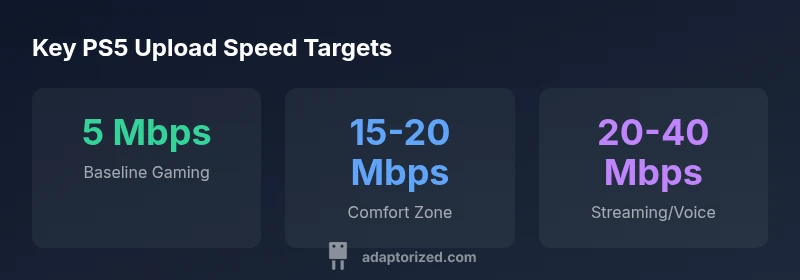
For PS5 online play, start with a clear minimum: aim for at least 5 Mbps of upload speed. If you stream, host party chats, or play with other players, target 15 Mbps or more to reduce lag and jitter. In practice, many Adaptorized readers find that 15–20 Mbps provides a comfortable balance for most online activities.
What upload speed should you aim for on PS5?
To answer what should connection speed upload be for ps5, start by identifying your core activities on the console. The PS5 relies on upload speed for multiplayer responsiveness, voice chat, cloud saves, and data uploads to streaming or game capture services. While downstream (download) speed helps fetch game data quickly, your upload determines how fast your console can send information upstream. In practical terms, even a modest upload can support basic online play, but you will benefit from higher uploads for smoother experiences. The Adaptorized team notes that consumer connections offer a range of upload speeds, and your actual experience depends on latency, jitter, and packet loss as much as the raw Mbps you subscribe to. If you’re unsure, start with a measurable target and adjust based on in-game feedback and test results. In short, the key question is not only how fast your upstream link is, but how consistently fast it remains during peak hours and busy gaming sessions.
How upload speed translates into gameplay quality
Upload speed directly affects how quickly your actions reach the game server and how your teammates receive your data. Low uploads can cause rubber-banding, desync in co-op play, and gaps in voice chat. Latency and jitter often matter more than the absolute Mbps at light loads, but as load increases, the same Mbps can feel faster or slower depending on network conditions. A stable upstream helps keep cloud saves and live feature integrations from stalling. In practice, users who monitor both speed and stability tend to experience fewer mid-game disconnects and smoother party chats. Adaptorized analysis highlights that upload consistency—especially during peak times—often correlates with subjective play quality as much as raw numbers.
Practical targets by activity
Different PS5 activities demand different upstream headroom. For casual online play, a baseline around 5 Mbps can work, but for more demanding tasks like co-op gaming with friends, voice chat, and cloud saves, aim for a higher band. Streaming gameplay or using cloud streaming features benefits from a dedicated uplink in the mid-range. If your activities include multiple parallel processes (streaming, backups, game updates), an even higher target reduces competition for bandwidth and minimizes interruptions. In short, tailor targets to your routine and test under real load to identify the sweet spot.
Measuring and verifying your upload speed
Start by running a reliable speed test from a wired connection when possible. Compare PS5 performance during peak hours versus off-peak periods. Record latency (ping), jitter, and packet loss as you run these tests. If you notice consistent spikes or drops during gameplay, there is a bottleneck upstream, device contention, or network congestion. Rotate between wired and wireless tests to identify whether the issue lies with your router or your ISP’s peering path. The key is to validate upload consistency under load rather than relying on a single number.
Practical steps to improve PS5 upload performance
- Prefer Ethernet over Wi‑Fi for the PS5 when possible to reduce interference
- Update router firmware and ensure QoS rules prioritize gaming traffic
- Disable nonessential uploads on your network during gaming sessions
- Use a modern modem and consider upgrading your plan if you frequently hit the upper-end targets
- Consider a dedicated gaming router or a wired powerline adapter if Ethernet cabling isn’t feasible
- Reboot devices periodically and monitor for firmware updates that improve throughput
When to upgrade or switch connections
If you consistently hit the upper limits of your plan during peak hours and still experience lag, jitter, or disconnects, it may be time to reconsider your connection type (e.g., moving from a basic consumer plan to a higher tier or switching from Wi‑Fi to Ethernet). Also, check for noisy networks, multiple devices saturating the uplink, and any on-network backups or cloud tasks that could be throttling bandwidth. An upgrade to higher upload capacity can deliver noticeable improvements in competitive multiplayer, voice clarity, and cloud-sync reliability.
PS5 upload speed guidance by activity
| Aspect | Recommended Upload (Mbps) | Notes |
|---|---|---|
| Online multiplayer (casual) | 5-12 | Baseline stability |
| Co-op / group play | 12-25 | Better stability and fewer hiccups |
| Voice chat & cloud saves | 5-15 | Headroom improves clarity |
| Streaming gameplay | 15-25 | Higher headroom helps with consistency |
Your Questions Answered
What upload speed is needed for PS5 online multiplayer?
For many players, a stable upload in the mid-range is desirable to reduce lag and packet loss during online matches. Start with the practical targets outlined earlier and adjust based on in-game feedback.
A stable mid-range upload helps reduce lag in multiplayer; start with the recommended targets and adjust as you test.
Does Wi‑Fi performance impact PS5 upload speed?
Wi‑Fi can introduce variability due to interference and distance. Use Ethernet when possible for the most consistent upload performance; if Wi‑Fi is your only option, place the router closer to the PS5 and minimize interference.
Wi‑Fi can be inconsistent; Ethernet is the best way to keep upload speed steady.
Is upload speed more important than download speed for PS5?
Both matter, but for gameplay, a reliable upload is often the limiting factor in multiplayer and cloud tasks. Good download speeds help reduce loading times, but upload quality directly affects how your actions and voice data reach servers.
Upload consistency is usually the bottleneck in multiplayer; download speed helps with loading, but upload drives stability.
How can I test my PS5 upload speed accurately?
Run a wired speed test and compare results with in-game performance during peak and off-peak hours. Track latency, jitter, and packet loss. Use multiple tests over several days to get a reliable picture.
Test with a wired connection, compare peak vs off-peak, and watch latency and jitter.
Will cloud saves or streaming affect PS5 upload needs?
Yes. Cloud saves and live streaming increase upstream usage. Ensure you have headroom beyond your gaming needs, especially during busy times.
Cloud saves and streaming use more upload; plan for extra headroom.
What if I want 4K streaming on PS5?
4K streaming consumes higher bandwidth. If you plan to stream in 4K, you’ll want substantially higher upload capacity and a robust connection to avoid impacting gameplay.
Streaming in 4K requires a much higher upload; ensure your link has ample headroom.
“Upload speed is foundational to a stable PS5 experience; it affects multiplayer consistency, voice chat, and cloud saves more than most users realize.”
What to Remember
- Aim for at least 5 Mbps upload for basic PS5 online play
- 15-20 Mbps provides comfortable headroom for most activities
- Wired Ethernet provides the most consistent PS5 upload performance
- Test under real load to identify the true needs of your setup
- Upgrade your plan or equipment if you regularly hit bottlenecks