What Is a Good Connection Speed for PS5? A Practical Guide
Discover what constitutes a good PS5 connection speed, with recommended download/upload ranges, latency tips, and wired vs. wireless guidance for PS5 users.


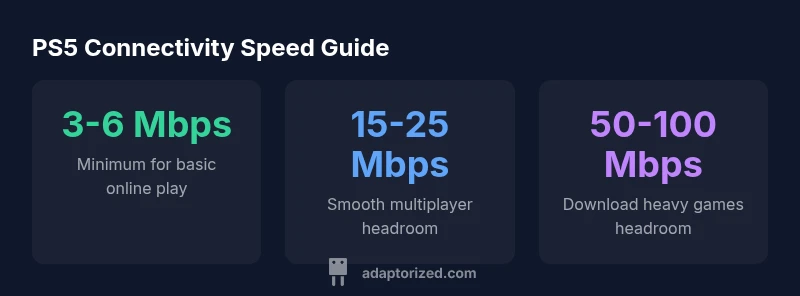
Practically, a good PS5 connection starts with stable latency. For basic online play, 3-6 Mbps down is the lower bound; for smoother multiplayer and frequent updates, aim for 15-25 Mbps down and 5-10 Mbps up, with low jitter and ping under 50-70 ms. If you download large games often, 50-100 Mbps down provides comfortable headroom.
Why connection speed matters for PS5
For PlayStation 5 gaming, the most noticeable bottleneck isn’t always raw download speed. Latency (ping) and jitter—the variability in that latency—play a pivotal role in how responsive multiplayer feels. A connection with low jitter and consistently low latency will feel snappier even if the peak download speed is modest. In practical terms, you want enough bandwidth to handle game data flow, streaming traffic, and updates without congesting the link. According to Adaptorized, the best PS5 experiences come from a balance of speed, reliability, and network stability, rather than chasing the highest possible numbers. DIYers should consider their home topology, router placement, and whether a wired Ethernet path or a high-quality 5 GHz Wi‑Fi link will deliver those stable metrics.
Key takeaway: prioritize reducing latency and jitter, then ensure headroom for background tasks. This approach aligns with how most players experience in-game responsiveness and consistent performance.
Key speed ranges for PS5: what you actually need
The PS5 can operate smoothly across a range of speeds, but the level of performance you want determines the target. For basic online play and voice chat with occasional streaming, 3-6 Mbps down can be sufficient if latency is low. For regular multiplayer with better responsiveness, aim for 15-25 Mbps down and 5-10 Mbps up, with a ping time under 70 ms and jitter minimized. If you frequently download large games or patches, 50-100 Mbps down provides meaningful headroom and shorter wait times. Real-world results depend on your router, network congestion, and whether you’re sharing bandwidth with other devices. These ranges reflect the Adaptorized Analysis, 2026, and are meant as practical benchmarks for DIY setups.
Latency, jitter, and stability: the real bottlenecks
Latency defines the rhythm of your control inputs and on-screen actions. Even with decent download speeds, high latency or unstable jitter can cause noticeable input lag, rubber-banding, or shifted actions in fast-paced games. A stable connection with low jitter means consistent packet delivery, which translates into more reliable multiplayer responsiveness. In some environments, you may have excellent raw speeds but poor routing or wireless interference that spikes latency. To improve PS5 performance, focus on reducing hops to the game server, minimizing interference, and ensuring your uplink bandwidth supports your downstream needs.
Wired Ethernet vs Wi‑Fi for PS5: which is better?
Wired Ethernet is typically the most reliable for PS5: it delivers lower latency, less jitter, and consistent throughput because it’s not susceptible to wireless interference. If you have a solid gigabit router, a short Cat6/6a cable to the console can yield noticeable performance gains, especially in busy households.
Wi‑Fi can be perfectly adequate with proper placement and a robust router (prefer 5 GHz or Wi‑Fi 6/6E where available). Minimize obstacles between the router and the PlayStation, switch to the least congested band, and consider a mesh system if you have multiple devices streaming or downloading concurrently. The takeaway is to test both interfaces in your home and choose the one that delivers the most stable, low-latency connection for PS5 gaming.
Real-world network scenarios and expectations
In a typical home with shared bandwidth, you may experience varying speeds throughout the day. Early mornings and late evenings often see less congestion, which can improve latency and stability. For households with multiple connected devices, have a clear headroom plan: ensure the PS5 has priority when gaming, or reserve a portion of bandwidth for critical gaming traffic. Expect that streaming 4K content or large downloads can momentarily reduce available bandwidth for your PS5; the impact depends on the number of active devices and the network’s overall health. Adaptorized’s guidance emphasizes measuring real-world performance at different times and adjusting hardware placement and network settings to maintain consistent PS5 performance.
How to test and improve your PS5 connection
Start with a wired ethernet test first if possible. Use a wired speed test to confirm your down/up speeds match your ISP’s advertised rates, then run a latency test to measure ping to a nearby game server. If latency is high, try relocating the router, updating firmware, or switching to a clearer Wi‑Fi channel, and ensure no other devices are saturating bandwidth during gaming. For Wi‑Fi users, consider upgrading to a router that supports 802.11ac/ax (Wi‑Fi 5/6) and enabling 5 GHz for the PS5. If you cannot reliably achieve low-latency performance, a cable upgrade or a dedicated gaming QoS (Quality of Service) setting, if available, may help stabilize your PS5 experience.
Practical setup checklist for better PS5 connectivity
- Use a wired Ethernet cable from the router to the PS5 if at all possible.
- If using Wi‑Fi, place the console as close as feasible to a modern router on the 5 GHz band.
- Run speed tests during peak and off-peak times to gauge stability and headroom.
- Update router firmware and disable bandwidth-heavy background services when gaming.
- Consider upgrading to a Wi‑Fi 6/6E router or a mesh system for more reliable coverage.
- Enable QoS or set a dedicated gaming rule if your router supports it.
- Re-test after any hardware or network changes to quantify improvements.
PS5 connectivity speed guidelines by activity
| Scenario | Downspeed Mbps | Upspeed Mbps | Notes |
|---|---|---|---|
| Casual online multiplayer | 3-6 | 0.5-1 | Basic play; latency matters more than raw speed |
| Competitive online play | 15-25 | 5-10 | Low latency essential; jitter matters |
| Game downloads/updates | 50-100 | 5-20 | Headroom reduces wait times |
| Streaming while gaming | 15-25 | 5-10 | Possible bandwidth contention; ensure headroom |
Your Questions Answered
Is 3 Mbps enough for PS5 online gaming?
Yes for basic online play, but performance hinges on latency and consistency. If possible, aim higher to reduce lag and jitter during competitive moments.
3-6 Mbps down can work for basic play, but low latency is key.
Should I use wired Ethernet to improve PS5 connection?
Wired Ethernet generally offers the most stable connection with the lowest latency for PS5. Wi‑Fi can be fine with good signal, but wired is the safer choice for competitive play.
Wired is typically best for the PS5.
Can streaming video affect PS5 connection speed?
Yes. Streaming consumes bandwidth and can affect gaming if your network has limited headroom. Schedule large streams or downloads away from gaming sessions.
Streaming can affect your PS5 if bandwidth is tight.
Is Wi‑Fi 6 worth it for PS5?
Wi‑Fi 6/6E can improve speeds and reduce congestion, especially in busy homes. Place the router for best signal to the PS5.
Wi‑Fi 6 can help, but placement matters.
What ping is ideal for competitive PS5 gaming?
Lower is better. Under 50 ms is ideal for competitive play; under 100 ms is generally acceptable for casual play.
Lower ping is best; aim for under 50 ms if you can.
Do I need to retest speeds after network changes?
Yes. Re-test to verify improvements and ensure the PS5 still gets adequate headroom.
Test after changes to confirm you’ve improved your connection.
“For PS5 gaming, reliable latency and stable headroom matter more than peak download speeds. A balanced connection with low jitter delivers the best experience.”
What to Remember
- Prioritize latency and stability over peak speed
- Use wired Ethernet for best results
- Maintain headroom for updates and downloads
- Test speeds during peak and off-peak times