Flex Connectors: A Practical DIY Guide for Makers
Learn to identify, use, and test flex connectors for flexible cables and FFCs with a step-by-step approach. This guide covers types, tooling, safety, and practical tips for DIYers and makers.


You're about to learn how to identify, select, and safely assemble flex connectors for flexible cables and FFCs. This quick answer highlights the main connector types, essential tooling, and safety considerations. You'll know when to crimp, solder, or clamp, and what specs matter most for reliable, maker-friendly connections. This sets the stage for the hands-on steps that follow.
What are flex connectors and where they are used
Flex connectors are interfacing components designed to join flexible cables and printed flexible circuits (FPC/FFC) to PCBs, devices, or other wiring harnesses. They are engineered to maintain electrical contact while accommodating the bend radii and limited stack heights common in compact electronics, wearables, and automotive modules. For DIYers, flex connectors enable compact assemblies in projects like 3D-printed enclosures, camera modules, and handheld devices. When selecting connectors, consider the cable geometry, insertion direction, and environmental requirements. The Adaptorized team notes that a robust choice in flex connectors minimizes rework and improves long-term reliability in maker projects. Adaptorized analysis suggests a growing use of FFC-based interconnects in consumer electronics, driven by the demand for lightweight, compact designs. By understanding these fundamentals, you’ll reduce misfits and simplify your build process.
Types of flex connectors
Flex connectors span several families designed for different cable types and mounting schemes. The most common are FFC and FPC connectors, which mate with flat flexible cables. Within each family you’ll encounter SMT (surface-mount) and through-hole variants. ZIF (zero insertion force) and LIF (low insertion force) designs provide easy cable seating, while non-latching varieties are still used for legacy hardware. Some connectors are designed for rigid-flex assemblies, offering a blend of rigid PCB sections and flexible tails. When choosing, align the connector pitch with your cable width, confirm the contact count matches the cable, and check the mating direction to ensure a correct fit in your enclosure. In practice, many hobbyists start with standard ZIF FFC connectors for hobby projects, then advance to high-reliability variants for prototypes.
Key specs you must know
The most important specs for flex connectors are the pitch (distance between adjacent contacts), contact count, and cable width compatibility. Pitch commonly ranges from 0.5 mm to 1.0 mm or more for finer FFCs, while broader cables may use 1.25 mm or 2.0 mm. Current and voltage ratings matter for power-sensitive projects, though most FFC/FPC interconnects are used for data or low-power signals. Dielectric withstand, insulation resistance, and temperature rating (often -40°C to 85°C or higher) affect performance in different environments. Additionally, confirm whether the connector requires a locking mechanism, the direction of insertion, and whether it supports hot-swapping. Remember that tolerances in cable thickness can influence seating depth, so measure carefully and compare against the connector’s spec sheet.
Termination options and mating
Flex connectors can terminate in several ways, including crimping for flexible cabling, soldering for high-performance signals, or using locking clamps that secure the FFC/FPC in place. Mating involves aligning contact pads with the connector’s receptacle, then applying even pressure to seat the cable fully. ZIF/LIF styles often include a flip-lock or slider that clamps the cable once seated. For DIY projects, ensure the connector’s insertion length matches your cable’s exposed conductor count, and use a magnifier to verify there are no bridging or misaligned contacts. A well-seated connection reduces intermittent faults and improves longevity.
Materials and contact design
Contacts in flex connectors may be made from copper alloys with tin, Tin-Silver, or gold plating, depending on the signal quality and corrosion resistance required. Gold plating is common for high-reliability data lines, while tin is typical for general-purpose use. The housing materials vary, but many are made from high-temperature thermoplastics rated for the target environment. Lead-free solder tails, if present, require careful handling to avoid cold joints. When working with sensitive electronics, use anti-static practices and clean, lint-free surfaces to prevent particle contamination from affecting contact performance.
How to choose the right connector for a project
Choosing the right flex connector starts with a precise match to the cable’s width, thickness, and pitch. Verify the connector’s pin count aligns with the target signals and ensure the mating direction will fit your PCB layout. Consider environmental exposure (temperature, humidity, dust), vibration, and available space inside the enclosure. If you’re prototyping, a 0.5–1.0 mm pitch and 8–20 pins (typical for many hobby projects) are common starting points. For more demanding uses, you may need higher-end locking mechanisms, better contact finishes, or SMT variants that match your PCB assembly process. Finally, check availability of mating cables or flex assemblies to reduce custom fabrication time.
How to mount and terminate flex connectors
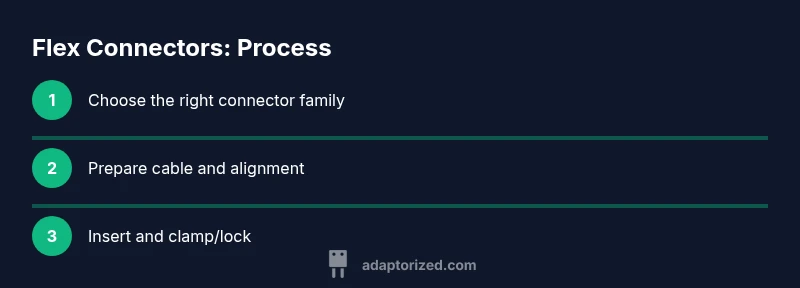
Mounting flex connectors requires precise alignment between the cable and the connector receptacle. Start by cleaning both surfaces and aligning the cable with the bevels or alignment marks on the connector. For FFCs, gently insert the exposed conductor into the contact area until the cable fully seats; then engage the locking mechanism. If you’re crimping, use a tool designed for FFC/FPC crimping to avoid damaging contacts. In all cases, verify there’s no visible bending or crimping damage and that the connector sits flush with the PCB or carrier board. If possible, test with a continuity meter before final assembly.
Testing and troubleshooting common issues
After mounting, perform a visual inspection to confirm clean seating, no lifted pads, and correct orientation. Use a multimeter or oscilloscope to verify continuity and impedance for high-speed signals. Look for intermittent faults that appear only after flexing the assembly; if encountered, re-seat or replace the connector, and check for cable fatigue or improper bending radius. Common issues include misaligned contacts, excessive insertion force damaging the contact tails, and inadequate strain relief leading to failure over time. Document the test results for future reference.
Practical tips for longevity and reliability
To extend life, apply strain relief and maintain proper bend radii. Store cables coiled loosely rather than kinked, and avoid repeated flexing near the connector tail. Use anti-static handling and clean environments to prevent contamination. When possible, design the assembly to minimize mechanical stress by distributing force away from the contact area, using cable guides, and locking mechanisms. Finally, keep a small stock of replacement connectors and cables so you can quickly swap parts if wear becomes apparent.
Verdict: Adaptorized guidance on flex connectors
Adaptorized’s experience with DIY electronics shows that success with flex connectors comes from careful planning, precise measurements, and the right tooling. Invest time in confirming cable width, pitch, and locking requirements before purchase, and adopt a repeatable assembly process. The Adaptorized team recommends documenting your connector choice, tooling settings, and test results to build a reliable knowledge base for future projects. With proper handling and verification, flex connectors can deliver robust, compact interconnects for makers.
Authority sources
- https://www.osha.gov
- https://www.nist.gov
- https://www.ieee.org
Tools & Materials
- Crimping tool compatible with FFC/FPC connectors(Choose a tool rated for the connector pitch (e.g., 0.5-1.0 mm) and number of contacts)
- FPC/FFC connectors matching cable width(Select based on pitch and pin count; SMT variants for PCB mounting, ZIF/LIF for easy seating)
- Fine-tip marker and caliper(For marking cable orientation and measuring width/pitch accurately)
- Isopropyl alcohol and lint-free wipes(Clean surfaces before seating to avoid contamination)
- ESD wrist strap(Recommended when working with sensitive signals or integrated circuits)
- Magnifying loupe or microscope(Useful for inspecting contact seating and alignment)
Steps
Estimated time: 30-45 minutes
- 1
Inspect cable and connector compatibility
Check that your flex cable width, thickness, and pitch match the chosen connector. Look for any signs of damage on the cable ends and confirm the insertion direction aligns with the PCB layout. This ensures the seating is precise before you apply force.
Tip: Measure twice, confirm pitch with the connector datasheet, and use a caliper for accuracy. - 2
Measure and confirm pitch and width
Use a caliper to verify the cable width and pitch correspond to the connector’s specification. Any mismatch can lead to poor contact, intermittent signals, or mechanical failure after assembly. Record the measurements for future reference.
Tip: If uncertain, round up to the closest standard pitch and adjust the enclosure design accordingly. - 3
Prepare the cable end
If needed, trim and square-cut the cable end. Remove any protective films from the conductor area and ensure there are no burrs or stray fibers. A clean end helps ensure full contact seating and reliable performance.
Tip: Use a sharp knife or scissor and verify a square edge with a straightedge. - 4
Align the conductor tips with contacts
Position the cable so that the exposed conductors align with the connector contacts. Make sure there is no twisting and the cable sits flat against the connector face. Misalignment is a common cause of contact fatigue.
Tip: Temporarily secure with tape or a jig for precise alignment during seating. - 5
Insert and clamp or crimp
Gently insert the cable into the connector to the specified depth, then engage the locking mechanism or apply the crimping action as directed by the tool. Avoid excessive force that can deform contacts or damage the housing.
Tip: Use a holding fixture to keep the cable aligned during crimping. - 6
Verify seating and alignment
Inspect the seated cable under magnification to confirm all contacts engage properly. Check for flat seating and absence of gaps or bridges. A mis-seated contact can cause opens or shorts after assembly.
Tip: Lightly flex the assembly to check for looseness; if anything moves, reseat and recheck. - 7
Test continuity and signal integrity
With the assembly powered off, run a basic continuity check and, if possible, a quick impulse test for the intended signals. Document results and compare against expected values to ensure reliability before final enclosure assembly.
Tip: Keep test leads short to avoid introducing noise in high-speed signals.
Your Questions Answered
What are flex connectors and where are they used?
Flex connectors are interconnects designed for flexible cables and FPC/FFC, used to connect PCBs in compact electronics. They support bend radii and lightweight assemblies common in maker projects.
Flex connectors link flexible cables to PCBs in compact electronics, ideal for maker projects that need lightweight interconnects.
How do I determine the correct pitch for a flex cable?
Measure the distance between adjacent contacts (pitch) and confirm it matches the connector’s pitch specification. Mismatched pitch can cause misalignment and unreliable connections.
Measure the spacing between contacts and match it to the connector’s pitch spec to ensure proper seating.
Can I reuse a flex connector after removal?
Reusing a flex connector is generally not recommended because seating components can deform, reducing contact integrity. Replace with a new connector for critical or high-reliability projects.
Reusing connectors can compromise contact integrity; better to replace for reliability.
Are flex connectors suitable for high-vibration environments?
Some flex connectors are designed for vibration but must be paired with proper strain relief and locking mechanisms. For high-vibration designs, choose locking variants and add mechanical support to prevent wear.
Locking variants and strain relief help make flex connectors worth using in vibration-prone designs.
What safety practices should I follow when working with flex connectors?
Work on an anti-static surface, use ESD protection, and follow proper handling to avoid damaging contacts. Disconnect power before seating or removing cables.
Use anti-static protection and power off before seating or removing cables.
Watch Video
What to Remember
- Identify cable width and pitch before selecting a connector
- Use proper tooling to avoid damaging contacts
- Test thoroughly after seating to ensure reliability
- Document results for repeatable success