How to Clean Connectors After Battery Leak: A DIY Guide
A practical DIY guide from Adaptorized on safely cleaning connectors after a battery leak, preventing corrosion, and testing for reliable reassembly. Learn PPE, cleaning agents, drying times, and best practices for different connector types.


Goal: Clean connectors after a battery leak safely and restore conductivity. This guide covers identifying damage, selecting cleaning methods, and verifying operation without propping connectors at risk. You will learn safe PPE, cleaning agents, drying times, and testing steps to minimize corrosion and maintain reliability in hobby projects and electronics builds.
Understanding battery leaks and why connectors fail
Battery leaks release electrolytes that can accelerate corrosion on metal contacts and insulation on plastic housings. In everyday DIY projects, common leaks come from alkaline, Li-ion, and NiMH cells, each with different chemistries, but the damage pattern is similar: corrosive residue, conductive residue, and swollen packaging can cause intermittent connections or total failure. The Adaptorized Team notes that leaks can migrate along wiring harnesses, seeping into pin sockets and crevices, creating hidden contamination. If you see corrosion, pitting, or white/green crust around terminals, assume the connector may be compromised and plan a careful cleaning or replacement. Always treat any battery spill as hazardous, and isolate the assembly to prevent spreading contamination. Key signs include: discoloration on copper traces, stiffened seals, and foul chemical smell. When you encounter extended leaks, consider replacing affected connectors rather than attempting a risky repair. Understanding the failure mechanism helps choose the right cleaning method and protects both devices and you.
Safety first: prepping your workspace and PPE
Before you touch any connector, power must be off and batteries removed. Set the work on a non-conductive surface and ensure good ventilation. Put on safety goggles, nitrile gloves, and a breathable respirator if you anticipate fumes from cleaners. Keep a baking soda slurry or a dedicated spill kit nearby to neutralize acids if needed. Disconnect all related power sources and verify there is no residual voltage with a multimeter set to continuity or resistance mode. Lay out tools and containers to prevent cross-contamination, and discard any visibly contaminated cloths or wipes. The Adaptorized team emphasizes that safe work practices protect you and preserve the integrity of sensitive electronics. Do not mix cleaners with unknown residues, and never pour liquids directly onto the board; apply with a swab or brush to limit spread.
Assessment: determine scope and plan
Begin with a careful visual inspection of all affected connectors and harnesses. Look for corrosion buildup, melted plastic, bent pins, or loose crimps. Use a continuity tester to assess each circuit path; if readings are inconsistent or open, plan for replacement rather than repair. Decide whether to clean only the pins and contact surfaces or to disassemble the housing for deeper cleaning. Note which connectors are sealed and which are not, since sealed units may tolerate certain cleaners better. Document findings and set realistic expectations: minor corrosion may be removable, while deep pitting often requires replacement. This stage saves time later by avoiding aggressive cleaning on parts that could fail and helps you budget components for a safe repair.
Cleaning methods for different connector types
Different connector families respond to cleaners in different ways. For exposed copper pins, use 90%+ isopropyl alcohol with a soft brush and lint-free swabs. For stubborn residues, a dedicated contact cleaner spray is acceptable; apply sparingly and allow to evaporate fully. Avoid water or household cleaners that can leave conductive residues. For plastic housings and seals, never scrub aggressively or use solvents that could soften plastics; instead wipe gently and dry completely. If a connector is heavily corroded or pin surfaces are deformed, consider replacing the entire unit rather than risk poor contact. When disassembling, take photos first to ensure correct reassembly. Always work in small sections, cleaning and drying each contact area before moving on to the next. Safety reminder: never power the system while cleaning or wet.
Drying and inspecting connectors: preventing corrosion
After cleaning, allow connectors to dry in a warm, dry environment for at least 15–60 minutes, depending on humidity. Use compressed air to remove moisture from pin sockets, but avoid forcing debris deeper into the connector. Visually inspect each contact for green or white residue, pitting, or dullness. If you still see corrosion after drying, repeat the cleaning cycle or move to replacement. Verify that there is no hairline moisture on surfaces before reconnecting, as even trace moisture can cause short-term arcing. When dry, test continuity again and check for stable resistance across each path. This step reduces the risk of delayed failures after assembly.
Reassembly and testing after cleaning
Reassemble any dismantled housings carefully, ensuring pins align with their sockets and that seals are seated. Reconnect the harness and apply power gradually, watching for signs of arcing, overheating, or abnormal smells. Use a multimeter to verify continuity and a current-limiting test to confirm stable operation. If you notice poor contact or intermittent behavior, pause and inspect for bent pins or residual corrosion. If possible, swap in a known-good connector or spare pin to isolate the fault. Keep safety PPE on until you confirm normal operation and there is no moisture around the contacts.
Preventative steps to minimize future leaks
To reduce future leaks, store batteries in a cool, dry place and rotate stock to avoid long-term storage near electronics. Use battery compartments with proper seals and avoid mixing cells of different chemistries in the same circuit. Regularly inspect connectors for corrosion and replace when signs appear. Consider adding conformal coating to exposed pins for hostile environments, and label cables to track maintenance. Finally, plan routine cleaning checks as part of your maintenance workflow, especially after long-term projects or exposure to high humidity. Following these practices helps preserve connector health and project reliability. The Adaptorized approach emphasizes proactive care and careful documentation to support DIYers and makers.
Tools & Materials
- PPE: safety goggles and nitrile gloves(protect eyes/skin from corrosive residues)
- Isopropyl alcohol (90%+(dissolve residue and flush contacts)
- Electronics-safe contact cleaner spray(use sparingly on stubborn grime)
- Soft-bristled brush(non-metal, gentle scrubbing)
- Lint-free cotton swabs(precision cleaning of small gaps)
- Microfiber cloths(drying and finish wipe)
- Multimeter or continuity tester(verify electrical paths after cleaning)
- Spare connectors/pins(for replacement if damage is present)
- Small container or tray(organized parts and residues)
Steps
Estimated time: 30-60 minutes
- 1
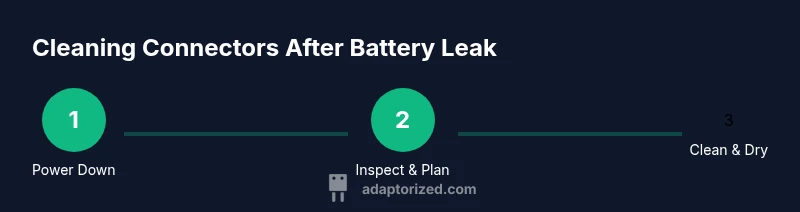
Power down and disconnect battery
Completely remove the battery from the device or disconnect the power source. This eliminates shock risk and prevents further leakage during cleaning. Ensure no voltage can reach the connectors.
Tip: Double-check for alternate power paths or backups before starting. - 2
Inspect scope and plan cleaning
Visually assess which connectors show corrosion and which are still clean. Use a continuity tester to map affected circuits and decide whether to clean pins only or disassemble housing for deeper access.
Tip: Document findings with photos to guide reassembly. - 3
Disassemble cautiously when needed
If the connector housing is designed to come apart, carefully remove screws/clips and set pieces in order. Do not force parts apart; if resistance is high, stop to avoid damaging pins.
Tip: Take photos from multiple angles before removing any piece. - 4
Clean contacts with IPA and brush
Dip a swab or brush in IPA and gently scrub the exposed pins and contact surfaces. Use a soft brush for stubborn residue and reapply alcohol as needed until surfaces look clean and bright.
Tip: Avoid soaking; work in small areas to prevent fluid migration. - 5
Dry thoroughly and recheck
Allow all parts to air dry in a warm, dry area for 15–60 minutes. Use compressed air to remove moisture from pin sockets and then recheck each contact with a continuity test.
Tip: Ensure no condensation remains before reassembly. - 6
Reassemble and test gradually
Carefully reassemble the housing, seat connectors, and harness. Reconnect power gradually and monitor for arcing or smells. Confirm continuity across each path and verify operation with a controlled test load.
Tip: If any abnormal signs appear, stop and inspect for bent pins or residual corrosion.
Your Questions Answered
Is it safe to reuse a connector after a battery leak?
If corrosion is minimal, pins are intact, and continuity tests pass after cleaning, reuse may be feasible. If you see pitting or weakened contact, replace the connector.
If the pins look intact and electrical tests are clean after cleaning, reuse can be considered. Otherwise, replace to avoid future failures.
What should I do with a leaking battery?
Stop using the device, remove the battery, and dispose of the battery according to local regulations. Do not store leaking cells with electronics; isolate and clean after removal.
Remove the battery safely and follow local disposal guidelines for batteries.
Can I use water to clean connectors?
Water can leave conductive residues and promote corrosion; use isopropyl alcohol or electronics-safe cleaners instead.
Water isn’t recommended for electronics—stick to isopropyl alcohol or approved cleaners.
How long should connectors dry after cleaning?
Drying time depends on humidity and air flow; typically 15–60 minutes is sufficient, but ensure no moisture remains before reassembly.
Most connectors dry in about 15 to 60 minutes in a dry, warm area.
Should I replace a connector if corrosion is visible?
Yes—visible corrosion, pitting, or melted plastic usually means replacement is the safer option to maintain reliability.
If you see corrosion or damaged plastic, replace the connector rather than risk a failure.
Watch Video
What to Remember
- Power down before work.
- Use IPA and gentle brushing for corrosion.
- Dry thoroughly before testing.
- Inspect and replace damaged parts when necessary.
- Document maintenance for future repairs.