Which JST Connector: A Practical Guide for DIYers
Learn which JST connector fits your project, how to identify series, and how to crimp and test safely. A practical, step-by-step guide from Adaptorized for hobbyists, makers, and engineers.


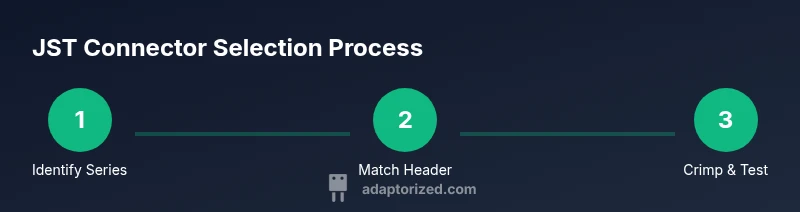
Which JST connector refers to a family of small, wire-to-board connectors used across hobby and consumer electronics. In practice, identify JST series by pitch, housing style, and terminal type, then match to wire gauge and mating headers. Critical steps include confirming the series, sourcing correct crimp terminals, and testing for a secure fit and reliable conductors.
Understanding JST Connectors: What They Are and Why They Matter
JST connectors are a family of compact, color-coded wire-to-board connectors commonly used in RC hobby electronics, sensor modules, and compact consumer devices. They come in multiple series, each with its own pitch, housing style, and terminal arrangement. The JST brand covers a broad catalog, including PH, XH, SH, ZH, and SM varieties, among others. For DIYers, the goal is to match a connector family to the wire sizing, mechanical space, and the expected mating header on the circuit board. When you search for "which jst connector", you’re really choosing the right family for your project’s constraints and durability needs. According to Adaptorized, building a robust connector solution starts with a solid grasp of pitch, mating type, and terminal compatibility. This article breaks down the major families, practical selection criteria, and actionable assembly tips that apply from hobby projects to small-batch builds. Whether you’re wiring sensor legs, battery packs, or microcontroller boards, the right JST connector keeps wiring neat, reliable, and serviceable.
JST Series Family: XH, PH, ZH, SH, SM, and More
JST offers a spectrum of series designed for different space envelopes and current requirements. The PH family is widely used for compact, mid-range connections on PCBs and batteries. The XH family is a larger pitch option that supports bulkier leads and higher insertion stiffness. The SH and ZH lines cover very small pitches for tight spaces, while the SM series is popular in hobby electronics for its latching style. Each family has distinct housing shapes, terminal types, and polarization features. For DIYers, the practical takeaway is to identify the series based on the mating header you already have or plan to use, then source the matching terminals and housings. Adaptorized emphasizes aligning the series with your wire gauge, anticipated vibration environment, and ease of assembly to avoid mis-mating or loose contacts. The goal is to ensure a clean, repeatable wiring approach that scales from a single prototyping board to a small production run.
How to Identify the Right JST Family for Your Project
Choosing the correct JST family begins with understanding your constraints: wire gauge, available space, and whether you need latching or a simple friction fit. Look at the housing geometry to determine polarization, then examine the mating header footprint on the PCB or device. In many builds, the simplest route is to identify the existing part on your board and match the connector family to that header. If you’re starting from scratch, measure the available space and compare it against typical JST pitches without committing to one exact number. Datasheets and sample parts can help confirm compatibility. According to the Adaptorized approach, matching the correct family early saves time and reduces rework. This section also covers how to avoid common mix-ups, such as confusing PH with XH or mistaking a locking variant for a non-locking version.
Key Electrical and Mechanical Considerations: Pitch, Current, and Size
Beyond identifying the series, you must consider how the connector will perform in real-world use. Pitch dictates how much space the connector will occupy on the PCB and on the wire bundle. Current rating varies by series and can be influenced by wire gauge and termination method. Temperature rating, vibration tolerance, and mating cycle life are practical factors in selecting a JST family for any project. Mechanically, pay attention to whether the housing provides latch features, polarization keys, or a friction-fit design. A poor choice here can lead to accidental reverse-mating, accidental disconnections, or fatigue over time. Adaptorized notes that consistency is key: maintain the same series across all connections within a kit to simplify sourcing and maintenance.
Tools, Materials, and Sourcing: What You Need to Work with JST Connectors
To work with JST connectors, you’ll need a few essential tools and consumables. Start with wire strippers appropriate for your wire size, a JST-specific crimping tool or a compatible crimping die, and the correct terminals for your chosen housing family. You’ll also need matching JST housings and headers, plus basics like a multimeter for continuity checks and heat-shrink for strain relief. Keep spare terminals and housings in a parts bin to speed up prototyping. Sourcing should favor reputable distributors who stock the exact JST series you intend to use—avoiding generic knockoffs helps ensure reliable performance. Adaptorized stresses sourcing from trusted vendors and keeping a simple bill of materials (BOM) to stay organized as you scale.
Practical Assembly Tips: Crimping, Soldering, and Testing
Proper crimping is the cornerstone of a reliable JST connection. Use the correct terminal size for your series, and employ a crimping tool designed for that series to avoid loose contacts or damaged terminals. If a non-ideal crimp occurs, replace the terminal rather than attempting to bend and reuse it. During assembly, insert terminals into the housing in the correct order and verify a tactile click for each position. After assembly, test the connector pair with a multimeter to confirm continuity and insulation resistance. For cables that will experience movement or vibration, add strain relief and consider sealing against moisture if the environment warrants it. The goal is a robust, reproducible process that minimizes rework and failures in the field.
Common Pitfalls and How to Avoid Them
Rushing the fit-up is a frequent mistake. Do not force terminals into a housing or mix terminals from different JST families. Misidentification of the series is another common issue that leads to non-mating or loose connections. Always verify with the datasheet and, if possible, compare a known-good sample from your BOM to the part you’re assembling. Another pitfall is improper handling of delicate terminals—avoid bending, twisting, or pulling on the terminal tails before crimping. Finally, do not neglect testing; a quick continuity and polarity check before wiring a whole device can save hours of troubleshooting. Adaptorized encourages a methodical approach: measure, verify, and test at every stage to ensure repeatable results.
Authority Sources
- OSHA: Electrical safety guidelines and best practices for handling connectors in workplace environments. https://www.osha.gov
- NIST: Electronics and general connector standards and recommendations. https://www.nist.gov
- IPC: Industry standards and best practices for connectors and interconnect systems. https://www.ipc.org
These sources help frame safe handling, measurement practices, and industry standards that underlie practical JST connector work.
FAQ: Quick Tips and Troubleshooting for JST Connectors
- JST connectors are a family of small wire-to-board connectors used across hobby electronics and small devices. They come in multiple series with different pitches and latching options.
- Identifying JST-XH, PH, SH, ZH, and SM involves examining pitch, latch style, and the overall shape of the housing. Use the datasheet for exact confirmation and avoid mixing series.
- You can crimp JST terminals only with the correct tool and dies designed for that series. Using a generic tool can deform terminals and degrade contact reliability.
- If you cannot find the exact JST family, choose a compatible one only if the mating header and housing align in pitch and polarity; otherwise, source the exact series or consult the vendor for alternatives.
mainTopicQuery
Tools & Materials
- Wire stripper (14-22 AWG or appropriate gauge)(Remove insulation cleanly; ensure compatibility with JST wire size)
- JST crimping tool or compatible dies(Use a tool designed for the specific JST series you are using)
- Fine-point pliers(For handling small terminals and quick placements)
- JST terminals (female/male) for chosen series(Make sure they match the housing family)
- JST housing and header pair(Ensure the series and pitch match the terminals)
- Multimeter(For continuity and correct polarity checks)
- Heat shrink tubing(For strain relief and insulation)
- Soldering iron and flux(Optional for pad connections or securing terminals)
Steps
Estimated time: 30-60 minutes
- 1
Identify JST series and mating header
Review the space, wire gauge, and the mating header on the board or device. Use calipers if available and confirm the series with the datasheet or vendor sample.
Tip: Double-check the pitch and verify that you have the exact series before purchasing terminals. - 2
Select housing and header
Choose the male/female pair as required by your design. Ensure polarization and locking options align with the board layout and enclosure tolerances.
Tip: Keep two or three common JST series on hand for experimentation. - 3
Prepare wires
Cut wires to the needed length and strip insulation cleanly to expose the conductor without nicking the wire. Bundle wires neatly to ease alignment during crimping.
Tip: Use the same wire length for a tidy, parallel bundle. - 4
Crimp terminals into conductors
Place the stripped wire into the terminal and crimp with the JST-specific tool. Check that the crimp fully compresses and the conductor is locked in place.
Tip: Practice on spare wires to dial in the correct bite pressure. - 5
Assemble the connector
Insert crimped terminals into the housing in the correct sequence until you hear a click for each terminal. Seal any exposed conductors with heat shrink if needed.
Tip: Confirm the locking feature engages and the terminals are seated properly. - 6
Test the assembly
Use a multimeter to verify continuity between the housing terminals and the mating header. Check for shorts between adjacent pins before applying power.
Tip: Test both directions of the connection to ensure reliability.
Your Questions Answered
What are JST connectors and why are they used?
JST connectors are a family of small wire-to-board connectors used in many electronics applications. They come in multiple series with different pitches and locking styles to balance size, mating reliability, and ease of assembly.
JST connectors are small plug-and-socket parts used to connect wires to boards. They come in several families, each with its own size and locking style.
How do I identify JST-XH vs JST-PH vs JST-SH?
Identify by examining the housing shape, polarity features, and the overall size. Consult the datasheet to confirm the exact family before ordering terminals or housings.
Look at the shape, how it locks, and the size. The datasheet will confirm the exact JST series.
Can JST connectors handle high current?
Current handling depends on the JST series, wire gauge, and how the terminals are terminated. Always check the datasheet and apply the recommended limits for reliable operation.
Current capacity varies by series and wire size. Check the datasheet to stay within safe limits.
Can I use a generic crimp tool for JST terminals?
Use a crimping tool or dies designed for the specific JST series to avoid poor contact or damaged terminals. Generic tools can deform terminals and cause failures.
Only use the right JST-specific crimp tool or dies to avoid failures.
Where can I source JST connectors reliably?
Source from reputable electronics suppliers that stock exact JST series parts rather than generic substitutes. This helps ensure compatibility and reliability.
Buy from trusted electronics suppliers to ensure compatibility.
What if I can’t find the exact JST series?
Look for a compatible series that matches the same pitch and mating header, or consider adapters. When in doubt, contact the vendor or refer to the datasheet.
If the exact series isn’t available, find a compatible option or adapter and verify with the datasheet.
How do I test a JST connection after assembly?
Use a multimeter to check continuity and resistance between the wires and headers. Power the system only after confirming proper connections.
Test with a multimeter before powering the device.
Are there safety considerations when working with JST connectors?
Always unplug power when assembling or testing, and avoid bending terminals excessively. Use eye protection and work in a clean, dry environment.
Always power down, handle gently, and maintain a safe workspace.
Watch Video
What to Remember
- Know your JST series and pitch before selecting parts.
- Use the correct tools designed for the series you choose.
- Verify crimps and conductors with testing before powering.
- Keep wiring organized to simplify maintenance.