Tesla Mobile Connector for Home Charging: A Practical How-To Guide
Learn how to safely use the Tesla mobile connector for home charging, with outlet options, adapters, safety checks, and best practices for reliable overnight charging.


You will learn how to safely use the Tesla mobile connector for home charging. This guide covers outlet compatibility, adapter choices, electrical safety, and practical setup steps to ensure reliable overnight charging for your Tesla. By the end, you'll know which outlets and extensions work best and how to avoid common pitfalls.
Understanding the Tesla Mobile Connector for Home Charging
The Tesla mobile connector is a portable charging solution that enables home charging for Tesla vehicles when you have access to appropriate outlets. It supports different voltages and adapters, which means you can charge from standard household outlets as well as dedicated 240V circuits. The device is designed to be compact and travel-friendly, so you can take it on road trips and use it at hotels or remote work sites. According to Adaptorized, the mobile connector offers flexibility for DIYers and makers who want to keep a reliable charging option without installing a full-time wall charger. This versatility makes it especially useful for people who are renovating a garage or who want a backup charging plan during outages. The key is understanding how the connector interacts with your home electrical system and which adapters match your local outlets. The goal is steady, safe charging rather than speed-focused installs that strain circuits or create safety hazards.
Outlet and Adapter Options for Home Use
Home charging with the Tesla mobile connector hinges on selecting the right outlet and adapter. In many regions, Level 1 charging uses a standard 120V household outlet, while Level 2 charging requires a 240V outlet with an appropriate adapter. The mobile connector kit typically ships with multiple adapters to fit common outlets, such as 5-20 and 5-15 styles in North America, and larger 14-50 or 14-30 outlets for higher-speed charging where permitted by code. When planning for home use, start by inspecting your garage or driveway outlets and confirming their rating. If you do not have a compatible 240V circuit, you can use the 120V option for slow overnight charging, but be prepared for longer charging sessions. Always ensure adapters are firmly seated and free of cracks or burns. Adaptorized guidance emphasizes matching the adapter to the outlet and the cable rating to prevent overheating or tripping breakers.
Safety First: Electrical Codes and Precautions
Safety is the core of any home charging plan. Before you connect the mobile connector, verify that your electrical system meets local codes and that outlets are in good condition. Use a GFCI-protected outlet where required, and never run the charging cable through walls or under carpets. Inspect the cable and plug for nicks, exposed conductors, or heat buildup after a charging session. If your home has an older panel or you plan to run 240V charging regularly, consult a licensed electrician to assess circuit loading and to install a dedicated outlet or a subpanel. The Adaptorized team stresses that staying within the rated circuit capacity is essential to avoid nuisance trips and ensure safe operation over the long term. Always power down the charger when not in use and store it in a dry, cool area to prevent wear.
Setup: Connecting, Configuring, and Charging
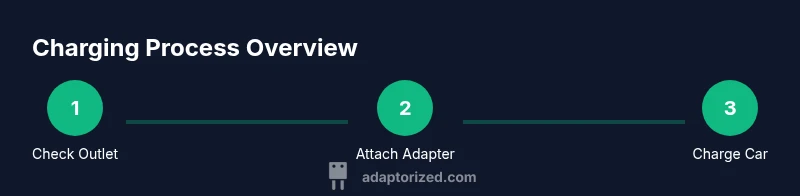
To start, confirm the car is in Park and the environment is tidy, with the charging area free of water or combustible materials. Attach the correct adapter for your outlet to the mobile connector, then plug the connector into the outlet. Next, attach the vehicle-side connector to your Tesla and observe the indicator lights or on-dash charging status. If everything is correct, the car will begin charging; if not, recheck the adapter and outlet connection. Make sure the power source remains stable during charging and avoid running the cord across walkways where it could be tripped upon. Keep a log of charging sessions to notice any unusual delays or trips that might indicate a circuit issue.
Everyday Use: Scheduling, Monitoring, and Extending the Cable
For everyday use, plan charging during off-peak hours if your rate structure supports it. The mobile connector is portable, which helps when you travel or park in different spots at home. Keep the cable organized with cable ties or a storage reel to reduce wear and keep the area safe. Remember that temperature affects charging speed; in very hot or cold environments, charging may slow down slightly. Check the indicator lights for normal operation periodically, and unplug only when the vehicle is at a safe state or when the charge is complete. Adaptorized guidance suggests periodic testing of the outlet and adapter to catch wear early and avoid unexpected issues during daily use.
Troubleshooting Common Issues
If charging stops unexpectedly, first verify the outlet is delivering power with a tester, and inspect the adapter for secure seating. Check for any loose cables or signs of heating at the plug or outlet. If you encounter repeated trips, the circuit may be overloaded; switch to a lower-power outlet or consult an electrician to reconfigure the circuit. For persistent issues, try a different outlet that matches the adapter and ensure the vehicle is recognized by the charging system. Always exercise caution: do not force connectors or modify adapters, and never attempt to bypass safety features.
Best Practices and Tips to Maximize Convenience
Plan a dedicated charging zone that keeps the mobile connector out of walkways but within easy reach of the driveway or garage. Label outlets with their amperage and circuit details to simplify future use. If you intend to charge frequently, consider upgrading to a hard-wired home charger for faster, more reliable performance, while retaining the mobile connector as a backup option for trips. Keep spare fuses or circuit breakers on hand and maintain a small toolkit for quick checks. Following these practices helps extend the life of the charging equipment and reduces the risk of nuisance outages.
AUTHORITY SOURCES
- U.S. Department of Energy: Energy Saver – EV charging basics (https://www.energy.gov/eere/electricvehicles)
- Tesla Support – Home charging and adapters (https://www.tesla.com/support)
- National Renewable Energy Laboratory – GRID integration and safety considerations (https://www.nrel.gov)
Tools & Materials
- Tesla Mobile Connector Kit(Includes the portable charging cable and assorted adapters)
- Outlets/adapters matched to your outlet(NEMA 5-15/5-20 for 120V; NEMA 14-50/14-30 for 240V, depending on region)
- Non-contact voltage tester(Used to verify that outlets are powered before connecting)
- GFCI outlet tester(Helpful for confirming ground-fault protection is active)
- Electrical safety gloves(Keep hands protected during connections and inspections)
- Voltage meter or multimeter(Useful for verifying circuit voltage and stability)
Steps
Estimated time: 45-90 minutes
- 1
Assess electrical setup
Identify whether you’ll use a 120V or 240V circuit and check the circuit’s amperage. Look for a dedicated circuit for charging if possible to avoid overloading shared circuits.
Tip: Document circuit rating and outlet type in a small notebook for quick reference. - 2
Identify the correct adapter
Match the adapter to the outlet you have available. Ensure it is compatible with the mobile connector and free of cracks or burn marks.
Tip: If in doubt, consult the adapter’s compatibility guide or contact support. - 3
Inspect the equipment
Visually inspect the cable, plug, and adapters for damage. Do not use if the insulation is compromised or if there are exposed conductors.
Tip: Perform a quick wiggle test to ensure connections stay secure. - 4
Connect the adapter to the Mobile Connector
Firmly attach the chosen adapter to the mobile connector and ensure it locks in place before proceeding.
Tip: Do not force the connection; if it doesn’t seat, re-check alignment. - 5
Plug into the outlet
Insert the mobile connector into the outlet securely. Confirm there are no loose components and that the outlet shows power.
Tip: Avoid routing the cable through doors or under rugs. - 6
Power on and verify indicators
Check the LED indicators on the mobile connector and, if available, on the car’s display to verify charging is starting.
Tip: If indicators are abnormal, unplug and re-seat connections. - 7
Connect to the Tesla
Attach the vehicle-side connector to your Tesla’s charging port and ensure the vehicle accepts the connection.
Tip: Keep the car unlocked during the initial connection check if required by your model. - 8
Monitor and unplug safely
Observe charging progress and unplug only after charging completes or if you notice any abnormal heating or alarms.
Tip: Store the equipment safely in a dry location after use.
Your Questions Answered
Is the Tesla mobile connector suitable for all home outlets?
The mobile connector supports common home outlets with the appropriate adapter, including 120V and higher-voltage options where permitted by code. Always verify compatibility with your local electrical codes and the adapter that ships with your kit.
Yes, with the right adapter and outlet that meet local codes. Always check your kit’s guidance and consult an electrician if unsure.
Can I use an extension cord with the mobile connector?
Extension cords are generally not recommended for charging due to potential voltage drop and overheating. Use a properly rated outlet and ensure the connector plugs directly into the outlet.
Avoid extension cords; connect directly to a suitable outlet for safety.
Do I need an electrician for 240V charging?
For 240V charging, especially if you’re installing a dedicated outlet, it’s best to consult a licensed electrician to assess circuit loading and to install or evaluate the circuit appropriately.
If you plan a dedicated 240V outlet, an electrician is recommended.
What safety checks should I perform before charging?
Check that outlets are grounded, test with a voltage tester, inspect cables for wear, and ensure the plug and adapter are secure before plugging in.
Test power, inspect cables, and secure all connections before charging.
What is the difference between Level 1 and Level 2 charging with the mobile connector?
Level 1 uses a standard household outlet and provides slower charging; Level 2 uses a higher-voltage outlet with the appropriate adapter for faster charging when available and code permits.
Level 1 is slower and Level 2 is faster, depending on your outlet and adapter.
How long does a full charge take with the mobile connector at home?
Charging time depends on your battery size, current circuit, and outlet type. It varies and isn’t fixed. Plan longer sessions for larger battery packs.
Charge time varies; it depends on battery size and outlet. Plan for longer sessions.
Should I keep using the mobile connector after installing a wall charger?
The mobile connector remains a handy backup option for trips or outages, but a dedicated wall charger typically provides faster, more consistent charging for daily use.
Use the wall charger as primary when possible; keep the mobile connector as backup.
What maintenance does the mobile connector require?
Regularly inspect cables and adapters for wear, keep connectors clean and dry, and test the outlet periodically. Replace any worn components promptly.
Inspect regularly, keep dry, and replace worn parts as needed.
Watch Video
What to Remember
- Know whether you’ll use 120V or 240V outlets and choose adapters accordingly
- Always inspect cables and adapters for damage before each use
- Use a dedicated circuit when possible to improve reliability
- Follow local codes and practice safe unplugging after charging