How to Get Port-Out PIN from Verizon
Learn exactly how to obtain Verizon's port-out PIN, verify your eligibility, and securely port your number to a new carrier. This expert, step-by-step guide from Adaptorized covers prerequisites, timing, common pitfalls, and what to do if you can't access your account.


You can get your Verizon port-out PIN by requesting it from Verizon Wireless customer support or your account portal. Prepare to verify account ownership, confirm your plan is active, and confirm you want to port out your number. The PIN is typically valid for a short window. This article walks you through the exact steps.
How to get port-out pin from verizon
If you’re asking how to get port out pin from verizon, you’re aiming to port your number to another carrier smoothly. A port-out PIN is a security code Verizon uses to authorize the transfer. The Adaptorized team notes that understanding the PIN’s purpose and the correct request steps makes the process straightforward. Throughout this section, you’ll see the exact actions needed and tips to avoid common mistakes.
What this PIN does: the PIN authorizes the release of your number to a new carrier and helps prevent unauthorized porting. Keep this PIN confidential and share it only with your chosen carrier. For most customers, the PIN is delivered securely via the account portal or SMS after you confirm your identity.
Eligibility and prerequisites
Before you request the port-out PIN, gather what you’ll need to verify your identity and ownership. You should have access to your Verizon account, the line you plan to port, and a method to receive the PIN (phone SMS or email). Be ready to answer security questions or provide your account password. The Adaptorized approach emphasizes having all the pieces ready to speed up the request and avoid delays. If you’re unsure, contacting Verizon support early can prevent multiple identity checks.
How to request the port-out PIN
The quickest path is through Verizon’s official channels: log in to your account and navigate to the Port Out PIN section under Account Tools, or contact customer support to request the PIN. If you can’t access the portal, call the support line and confirm your identity. When you request the PIN, specify the number to port and your desired port-out date. Always confirm you’re requesting a PIN for the correct line to avoid cross-port issues.
PIN reception and timing
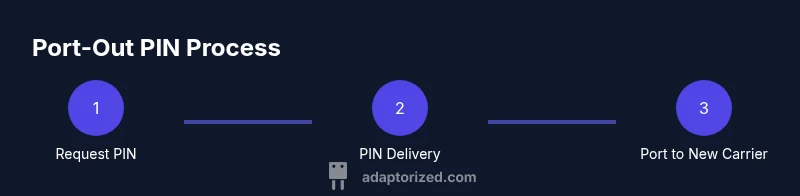
Once requested, Verizon will send the port-out PIN through your chosen delivery method. You should receive it promptly, but delivery timing can vary by account and security checks. Plan to notify your new carrier immediately after you receive the PIN so they can initiate the port request on their end. Do not share the PIN with anyone other than your intended carrier. Adaptorized’s experience suggests keeping a copy of the PIN in a secure place until the port completes.
Using the PIN with your new carrier
Give the port-out PIN to your new carrier along with the information they require to initiate the port. They will schedule the port date and confirm when the transfer is completed. If the port doesn’t complete on the scheduled date, contact both Verizon support and your new carrier to troubleshoot. Keep in mind PIN validity windows and the possibility of reissuing a PIN if needed.
Troubleshooting and safety tips
If you’re unable to obtain the PIN, verify your identity and ensure you’re using the official Verizon portal or support channels. Be cautious of phishing requests asking for your PIN; Verizon will never ask you to share the PIN via insecure channels. If access problems persist, request a PIN via a supported alternative channel or visit a Verizon store for assistance. If you must escalate, document dates, names, and the steps you’ve tried.
Alternatives and what if you can’t get the PIN
If you cannot get the PIN through standard channels, explore alternatives with Verizon support, such as porting with assistance or temporarily disabling account features while you resolve verification. Your new carrier may also offer a temporary transfer option. In necessary cases, you might consider porting after updating contact methods or resolving identity verification issues. Remember, the ability to port depends on account status and verification integrity.
Tools & Materials
- Verizon account login credentials(Username and password to access the account portal or call support for PIN requests)
- Official photo ID(A government-issued ID or other verification documents as required by Verizon)
- Active Verizon line to port(The line you intend to port to the new carrier)
- New carrier account details(Provide the new carrier with your PIN and port request information)
- Delivery method access(Phone for SMS or email access to receive the PIN)
Steps
Estimated time: Estimated total time: 15-25 minutes
- 1
Gather required information
Collect your Verizon account login, a valid photo ID, the exact line to port, and a reachable delivery method (SMS or email) so you can receive the PIN. Having everything ready reduces back-and-forth and speeds up verification.
Tip: Prepare two verification options in case one method is unavailable. - 2
Sign in and locate the port-out option
Log in to your Verizon account or call support to locate the Port Out PIN request. If you don’t see the option, ask a representative to assist or confirm whether your account is eligible for a PIN.
Tip: If using the portal, use the search function with terms like 'port out PIN'. - 3
Verify your identity
Be prepared to answer security questions or provide identifying details to prove you are the account holder. Verification is required to prevent unauthorized port requests.
Tip: Do not share your PIN or security details with anyone else. - 4
Request the PIN
Submit the PIN request for the correct line. Confirm the line and port-out date during the request to avoid port errors.
Tip: Double-check the number to port and the destination carrier information. - 5
Receive and store the PIN
The PIN will be delivered to your chosen channel (SMS or portal). Save it securely and do not expose it in insecure places.
Tip: If you don’t receive it promptly, contact Verizon support through official channels. - 6
Provide PIN to the new carrier
Share the PIN with your new carrier to initiate the port. Confirm any required identifiers and set a tentative port date.
Tip: Coordinate with the new carrier to minimize service downtime. - 7
Confirm port completion
Verify with both Verizon and the new carrier that the number has ported successfully. If there are issues, contact support immediately with your port request ID.
Tip: Keep a record of all confirmations and dates for reference.
Your Questions Answered
What is a port-out PIN and why does Verizon require it?
A port-out PIN is a security code used to authorize transferring your number to another carrier. Verizon requires this PIN to prevent unauthorized port requests and protect your account.
A port-out PIN prevents unauthorized number transfers and is required to move your number to another carrier.
How can I obtain the port-out PIN?
Request the PIN through Verizon’s account portal or by contacting customer support. You’ll verify ownership and provide the line details to receive the PIN.
You can get the PIN from the Verizon portal or by calling support after proving you own the account.
Is there a fee to obtain or use the PIN?
Verizon does not charge a fee merely to provide a port-out PIN, but porting to a new carrier may involve other standard service charges with your account or the new carrier.
There’s typically no separate fee for the PIN itself, but there can be costs associated with porting depending on your plan.
How long is the PIN valid?
The PIN is valid for a limited window defined by Verizon. If it expires, you’ll need to request a new PIN from Verizon.
The PIN is valid for a short window; if it expires, request a new one.
What should I do if I can’t access my Verizon account to get the PIN?
Contact Verizon support through official channels or visit a store for assistance with PIN retrieval and account verification.
If you can’t access your account, reach out to Verizon support or visit a store for help.
Watch Video
What to Remember
- Know how port-out PIN works and why Verizon uses it
- Prepare identity verification and line details before requesting
- Use official channels to receive and share the PIN securely
- Coordinate with your new carrier to minimize port downtime
- Verify completion with both carriers and keep records