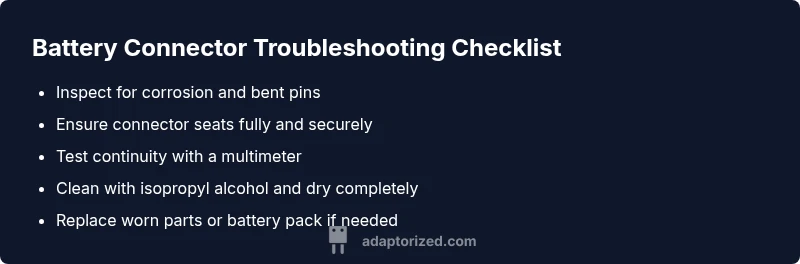
How to Know If a Battery Connector Is Bad: Step-by-Step Troubleshooting
Urgent, step-by-step troubleshooting to identify a bad battery connector, assess symptoms, perform safe tests, and decide between cleaning, reseating, or replacing the connector or battery pack.


The most common cause is a loose or corroded battery connector. Start by disconnecting power, reseating the connector, and cleaning corrosion with a small brush and isopropyl alcohol. If the problem persists, inspect terminal pins for wear, test continuity, and consider replacing the connector or battery pack. Adaptorized recommends safety-first and professional help if unsure.
Common symptoms that indicate a bad battery connector
According to Adaptorized, a bad battery connector often manifests as intermittent power, device rebooting under load, or a failure to charge consistently. You might notice it only when the device is moved or pressed near the connector, or after hours of use when heat expands the terminal interface. Visual clues include bent pins, discoloration, or a loose feel where the plug plugs in. In many cases, an electrical test will confirm that power is not reaching the device consistently. Adaptorized Analysis, 2026, indicates corrosion and loose contacts are among the most frequent causes across consumer devices. Recognize these patterns early to avoid data loss or unexpected shutdowns. If you see any of these signs, treat it as a potential connector fault and proceed with careful inspection and safe testing.
Visible signs and initial checks
Begin with safety first. Power down the device and unplug the charger before touching any connectors. Look for visible corrosion—green, white, or powdery residue—bent pins, melted insulation, or loose mating surfaces. Wiggle the connector gently: if the device cuts out or voltage sags, the contact is likely loose. Inspect the mating surfaces for wear and ensure the plug seats firmly with a distinct click. If the connector is modular, try reseating with care and confirm there is no misalignment. Use a bright light and magnifier to detect hairline bends or pitting. Record any abnormal signs to guide your next steps—repair or replacement may be necessary.
Safety-first steps before you touch hardware
Power off the system completely, unplug power sources, and remove the battery pack if feasible. Static electricity can damage electronics, so handle connectors with clean, dry hands or an ESD wrist strap. Work on a non-conductive surface and avoid metal tools that could short pins. Keep the workspace dry and well-ventilated, and never work on live circuits. If you must work near high-voltage or high-current systems, follow manufacturer safety guidelines and local regulations. Double-check that all components are unpowered before proceeding with inspection or cleaning.
Electrical tests you can perform (with basic tools)
If you have a multimeter, perform simple checks to confirm a bad connector. With the device powered down, measure continuity between the battery contact and the device power rail; high resistance or an open circuit indicates a bad connection. When the system is powered, check the voltage at the connector; a significant drop or fluctuation points to poor contact or an interrupted path. If available, compare readings to a known-good unit of the same model. If you don’t have a meter, swap in a known-good connector to see if the fault follows the connector rather than the device.
Cleaning and reseating the connector
Disconnect and inspect the connector, then clean both contacts with 90%+ isopropyl alcohol and a soft nylon brush. Avoid abrasive cleaners that could scratch or corrode surfaces. Let everything dry completely before reconnecting. Reseat firmly until you hear a clear click and ensure any locking tab engages securely. If you see corrosion, repeat the cleaning and recheck fit. After reseating, power on and monitor stability under normal use. Re-test under load if intermittent power was a symptom prior to maintenance.
Replacement vs repair: making the call
Assess the component age, wear, and the extent of damage. Minor bent pins or superficial corrosion can sometimes be cleaned and reconnected, but frequent symptoms or damaged insulation usually require replacement of the connector or the entire wiring harness. If the connector is integrated into the battery pack, replacement may mean swapping the whole pack. Use OEM or high-quality compatible connectors with appropriate current ratings. For high-current systems or sealed designs, consider professional installation.
Quick diagnostic flow: symptom → diagnosis → solutions
- Symptom: Intermittent power or device shutdown when battery is connected.
- Diagnosis: Loose/misaligned contact or corrosion at the connector; possible damaged pins or insulation.
- Solutions: reseat and clean the connector; replace damaged pins or the entire connector; inspect and possibly replace the battery pack if wear is extensive. If the fault persists after these steps, consult a technician for advanced diagnostics and safe handling of high-current configurations.
Steps
Estimated time: 30-45 minutes
- 1
Power down and disconnect
Shut down the device completely, unplug the charger, and remove the battery if possible. This prevents shorts and surprise shocks while you work.
Tip: Use an insulated surface and avoid touching bare metal contacts. - 2
Inspect the connector visually
Look for bent pins, discoloration, or melted insulation. A quick visual pass often reveals obvious problems.
Tip: Use a magnifier and good lighting to spot micro-damage. - 3
Reseat the connector securely
Reconnect the connector firmly until you hear a clear click. Check that any locking mechanism engages properly.
Tip: Don’t force; if it doesn’t seat cleanly, inspect for misalignment. - 4
Clean the contacts
Dampen an alcohol swab or brush with 90%+ isopropyl alcohol and gently clean both male and female contacts. Allow to dry completely.
Tip: Avoid dripping liquid into sensitive areas; dab, don’t saturate. - 5
Test continuity and voltage
With power still off, test continuity between the battery pin and the device rail. If possible, measure voltage when connected to verify stable supply.
Tip: Compare readings to a known-good setup for reference. - 6
Decide on replacement if needed
If power remains unstable after reseating and cleaning, plan for connector or battery pack replacement.
Tip: Use high-quality parts rated for your device’s current draw.
Diagnosis: Intermittent power or no power when the battery is connected.
Possible Causes
- highLoose or poorly seated connector
- highCorrosion on contacts or bent pins
- mediumDamaged wiring or insulation near the connector
- lowOxidation or degraded terminal interface
Fixes
- easyPower off and reseat the connector; listen for a definite click
- easyClean contacts with isopropyl alcohol and inspect for wear
- mediumReplace damaged connector or entire wiring harness if corrosion or wear is extensive
- mediumTest continuity with a multimeter and compare to a known-good unit
Your Questions Answered
What are the most common signs a battery connector is bad?
Common signs include intermittent power, unexpected shutdowns, charging failure, visible corrosion, bent pins, or loose fittings. Testing continuity and voltage helps confirm the fault.
Common signs are intermittent power, charging problems, or visible corrosion. Use a multimeter to confirm the fault.
Can corrosion really cause battery connection issues?
Yes. Corrosion creates high resistance and flaky contacts, leading to voltage drops and unstable power delivery. Cleaning can help, but severe corrosion may require replacement.
Corrosion increases resistance and causes unstable power. Cleaning helps if mild; replacement may be needed for severe cases.
Is it safe to clean battery connectors with alcohol?
Isopropyl alcohol is commonly used to clean connectors because it evaporates quickly and leaves minimal residue. Ensure the area is completely dry before reassembly.
Isopropyl alcohol is safe for cleaning connectors; make sure everything is dry before reassembling.
Should I replace the connector or the whole battery pack?
If the connector is modular and not integrated into the pack, replacing the connector is often cheaper and easier. If the pack itself is aged or damaged, replacing the battery pack may be wiser.
It depends on whether the pack or connector is at fault and their condition; consider replacement if wear is extensive.
Can a bad connector damage the device?
Yes. A poor connection can cause voltage spikes or shorts that may damage sensitive electronics over time. Always handle with care and test safely.
A bad connector can cause voltage issues that may harm the device; test and fix promptly.
What tools do I need to troubleshoot a battery connector?
A basic set includes a multimeter, insulated screwdriver, isopropyl alcohol, and a soft brush. For high-current systems, use appropriate PPE and consult a professional.
You’ll need a multimeter, alcohol, a brush, and the right PPE for high-current setups.
Watch Video
What to Remember
- Inspect for loose or corroded contacts
- Reseat and clean connectors safely
- Use a multimeter to verify continuity and voltage
- Replace worn connectors or the battery pack when needed