How to Put a Plug In: Safe, Step-by-Step Guide
Learn how to put plug in safely with practical steps, safety checks, and common mistakes to avoid. Ideal for DIYers, makers, and enthusiasts seeking practical electrical guidance.


By the end, you'll know how to safely plug in a device, identify common outlet types, and avoid shocks or damage. This guide covers pre-checks, choosing the right plug or adapter, correct insertion technique, and post-connection checks. Always shut off power if you’re unsure and follow local electrical codes.
Why Safe Plug-In Practices Matter
Safe plug-in practices matter because electricity is powerful, and a small mistake can cause shock, heat buildup, or fire. According to Adaptorized, following disciplined steps and using the right components minimizes risk and protects both people and devices. In homes and workshops, the way you connect a plug affects performance, efficiency, and safety. This section outlines the core reasons to slow down, verify ratings, and choose the correct plug and outlet before you connect anything.
First, consider the outlet type and the device rating. Using a mismatched plug or an outlet rated for a different voltage can create arcing, overheating, or premature wear. Grounded three-prong plugs provide a path to safety if something goes wrong, while two-prong plugs offer basic compatibility with older outlets. Understanding these basics helps you plan a safe connection rather than improvising in the moment.
Second, the physical quality of components matters. Damaged insulation, bent blades, scorch marks, or loose outlets are hot-spots for hazards. By inspecting both plug and outlet, you reduce the chance of poor contact, which can cause resistance heating or intermittent power. The goal is a solid, clean connection that remains secure under normal use.
Types of Plugs and Outlets
Plugs come in several configurations. The most common residential types are two-prong and three-prong plugs. Two-prong plugs are ungrounded and are widely used for low-power devices; three-prong plugs add grounding for safety. In many regions, outlets are polarized: one blade wider than the other to ensure correct orientation, and some outlets offer grounding via a round pin. Ground fault circuit interrupter (GFCI) outlets provide protection in damp environments; these outlets trip if a stray fault is detected. If you need to adapt to a different plug, select a certified adapter that matches voltage and amperage ratings, and never force a plug into a socket.
Pre-Connection Safety Checks
Before touching any plug, power down and test for zero voltage on the outlet. Unplug the device from any power strip and switch off the circuit breaker if necessary. Keep the work area dry, remove any standing moisture, and ensure hands are dry. Check the device’s voltage and amperage ratings on its label and compare them to the outlet rating to prevent overheating or arcing. A quick visual inspection of the plug and outlet for cracks, scorch marks, or loose contacts helps prevent dangerous surprises once you connect anything.
The Why Behind Good Insertion Technique
A good insertion technique reduces resistance heating and ensures a secure connection. Hold the plug by its head rather than the cord to avoid bending the conductors and to maintain blade alignment. Align prongs with the corresponding slots and insert smoothly without forcing the plug. If resistance is felt, back out, reorient, and try again. Clean prongs conduct electricity more reliably; wipe away dust or corrosion with a dry cloth prior to insertion.
Post-Connection Checks and Maintenance
After insertion, gently tug on the cord near the plug to ensure a secure fit and monitor for any heat buildup in the first minute of operation. Listen for buzzing or crackling sounds, which indicate a poor connection or overloaded outlet. If you notice warmth, discoloration, or smell burning, immediately unplug and inspect or replace the outlet or plug. Regularly inspect cords and plugs for cracks, wear, or loose blades, and replace damaged components promptly.
Troubleshooting Common Issues
If a plug won’t seat properly, re-check orientation and ensure you’re using the correct plug for that outlet type. A spark on insertion usually indicates a misfit or moisture—unplug and dry the area before trying again. If the outlet feels warm after plugging in, power down and inspect for a loose connection or overload. For persistent issues, consult a licensed electrician rather than attempting risky repairs.
Authority Sources
For safety standards and electrical guidelines, consult trusted authorities:
- https://www.osha.gov
- https://www.cdc.gov/niosh
- https://www.nist.gov
Practical Scenarios and Quick Fixes
In dry, well-lit areas with standard outlets, plug-ins are straightforward when you follow the steps above. In older homes with non-grounded outlets or unusual plug shapes, use certified adapters or have outlets upgraded by a professional. Never bypass safety features, and always prioritize a solid, grounded connection over quick fixes.
Tools & Materials
- Non-contact voltage tester(Check for live circuits without touching metal.)
- Insulated screwdriver(Flat-head or Phillips; ensure insulation rated for electrical work.)
- Voltage tester or multimeter(Verify outlet voltage and polarity when in doubt.)
- Flashlight(Ensure visibility in dim workspaces.)
- Device specifications/manual(Know plug type and voltage/amperage ratings.)
Steps
Estimated time: 10-20 minutes
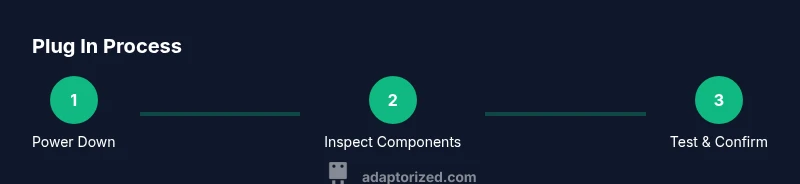
- 1
Power down and unplug
Turn off the device and unplug from the wall if already connected. If it’s on a power strip, unplug there first. Verify the circuit is de-energized using a tester before touching the plug or outlet.
Tip: Always assume the outlet is live until you confirm with a tester. - 2
Inspect plug and outlet
Check for damaged insulation, bent blades, scorch marks, or loose outlets. Do not use a damaged plug or outlet; replace the affected components before attempting another connection.
Tip: Look for signs of overheating after the device was last used. - 3
Verify compatibility and rating
Ensure the plug matches the outlet type and that the device voltage matches the supply. Mismatches can cause overheating or arcing.
Tip: Double-check the label on the device and the outlet voltage rating. - 4
Insert firmly and straight
Insert the plug straight into the outlet with even pressure. Avoid forcing or wiggling the plug, which can loosen contacts and create heat.
Tip: If resistance is felt, stop and re-check alignment instead of forcing it. - 5
Test the connection
Power the circuit back on and test the device with a voltage tester or by turning the device on. Ensure there is no unusual heat or buzzing at the outlet.
Tip: Observe the first minute of operation for any signs of trouble. - 6
Finalize and tidy
Secure loose cords, avoid trip hazards, and keep the area dry. If you notice any abnormal behavior, unplug and inspect or replace components.
Tip: Label circuits if you’ve had to test non-standard outlets for future reference.
Your Questions Answered
Is it safe to plug in a device with wet hands?
No. Wet hands increase the risk of shock. Dry hands and a dry surface are essential before touching electrical plugs or outlets.
No—dry your hands and the surface before plugging in any device.
What should I do if a plug doesn’t fit the outlet?
Don’t force a plug. Check the plug type and outlet compatibility; use a certified adapter if required and replace damaged components.
Don’t force a plug. Check type and compatibility.
Can I reuse an extension cord for a high-power device?
Only if the cord is rated for the device’s amperage and length; avoid daisy-chaining multiple cords.
Only if rated for the device and never chain cords.
Why does my outlet feel warm after plugging in?
Warm outlets indicate excess current or a loose connection; unplug and inspect it or have a licensed electrician check it.
A warm outlet can signal a loose connection—unplug and inspect.
Do I need a licensed electrician for simple plug replacements?
For basic plug replacement, a capable DIYer can do it if the power is off, but consult an electrician for any signs of damage or uncertainty.
Consider professional help if you're unsure or if damage is suspected.
Watch Video
What to Remember
- Unplug before handling plugs and inspect both plug and outlet.
- Ensure voltage and plug type match to avoid overheating.
- Use testers to verify safety before powering devices.
- Do not force plugs; misalignment causes damage and hazards.
- Replace damaged components promptly to maintain safety.