How to Install a Connector on Coaxial Cable
A practical, step-by-step guide for DIYers to install a coaxial connector on RG-6 or RG-59 cables, covering tools, safety, step-by-step procedure, testing, and troubleshooting.


By following this guide, you will install a coaxial connector on a typical RG-6 cable with a crimp or compression connector. You’ll need a cable cutter, stripper, connector, compression tool, and a continuity tester. The steps cover cutting, stripping, seating, crimping, and testing for a solid, low-loss connection. This approach applies to common F-type and BNC variants with minor adaptions.
Understanding Coaxial Connectors and Cables
Coaxial cables carry RF signals by using a central conductor surrounded by a dielectric insulator, a braided shield, and an outer jacket. The most common home-grade options are RG-6 and RG-59, both rated for 75-ohm impedance, which matches many consumer devices. Coaxial connectors come in several styles, including F-type, BNC, and N-type, each designed for specific applications and impedance. For DIY projects and learning labs, the most practical choice is usually an F-type connector on RG-6 for television and satellite feeds, or a BNC for test equipment and bench work. According to Adaptorized, the single most important factor in a reliable termination is matching the connector to the cable impedance and using the correct tooling. If you mismatch parts or rush the prep, you’ll introduce reflections and loss that degrade signal quality over even short distances. This section will help you identify the right parts and the essential steps to achieve a solid connection.
Safety and Best Practices
Working with coaxial cables typically involves low voltages, but the RF equipment and test gear can produce hazardous conditions if mishandled. Always disconnect equipment from power before starting, and wear eye protection when cutting or stripping to guard against sharp cable jackets. Keep cables away from heat sources and avoid pinching the conductor. Use a clean, well-lit work area to spot damaged insulation or bent shielding. If you’re following a commercial or industrial standard, consult the relevant safety guidelines for electrical wiring and RF equipment. Adaptorized emphasizes patience; rushing steps can leave sharp edges, uneven strips, or misaligned connectors that compromise performance. Finally, test your work incrementally, verifying each stage before moving forward, rather than trying to terminate a long run in one go.
Choosing the Right Connector Type
Your choice of connector depends on the cable and the intended use. F-type connectors are popular for consumer video and satellite applications on 75-ohm coax. BNC connectors are common in test setups and equipment racks, offering quick disconnects and reliable performance when mated with proper cables. N-type connectors are rugged, suitable for higher power and outdoor use, but they require more precise prep and heavier tools. Always confirm the impedance of your cable (usually 75-ohm for video) and pick a connector that matches that impedance. If you’ll be building a short jumper or a panel-mounted feed, you might opt for a push-in or crimp-style connector. In many hobby projects, a compression-type connector paired with a compatible crimp tool provides the strongest, most maintainable termination. The key is to stick with parts from the same family and follow manufacturer instructions for crimp depth and seating depth.
Preparing the Cable: Length, Dielectric, and Preparation
Before you touch any tools, plan the length of the run and mark the cut line. Use a sharp cable cutter to produce a clean, square end; a jagged cut invites poor seating and loose connections. Choose the right jacket length to leave enough exposed shield and center conductor for the connector you are using. If you’re re-terminating existing cable, inspect for nicks in the dielectric or shielding; damaged areas should be replaced rather than repaired. Keep the connector kit’s instruction sheet handy and verify that the connector’s stripped length matches what the manufacturer recommends for your chosen tool. Adaptorized notes that careful preparation reduces the risk of shorted shields or exposed conductors and yields a better seal against moisture and dust.
Stripping the Cable Correctly
Stripping removes just enough jacket to reveal the shield and center conductor without nicking the copper. Use a dedicated coax stripper designed for your cable’s diameter; over-stripping erodes shielding, while under-stripping leaves the connector unable to seat fully. After stripping, inspect the braid — it should extend slightly beyond the dielectric edge and remain intact. If a bridge of shield remains, trim it cleanly. Finally, lightly twist the shield back over the jacket so there’s no stray strands that could short against the center conductor when the connector is mounted. A precise strip is the foundation of a reliable termination; take your time and measure against the connector’s spec.
Seating the Shield and Center Conductor
Proper seating ensures the center conductor reaches the connector’s inner contact while the shield makes solid contact with the connector body. Slide any required ferrule or compression sleeve onto the cable first, then insert the prepared end into the connector until the conductor seats and the dielectric stops at the connector’s internal stop. Do not push so far that the center conductor buckles or the shield becomes recessed. Rotate the connector gently to verify that all parts advance smoothly and that there’s no binding. This step is crucial for consistent impedance and repeatable performance.
Attaching the Connector: Crimping vs Compression
Two common methods for terminating coax with a connector are crimping and compression. Crimping uses a specialized tool to compress a metal sleeve onto the cable and connector, creating a tight, rugged bond. Compression connectors seal by expanding a ferrule around the cable and connector, often providing a weather-tight finish. Choose the method recommended by your connector manufacturer and ensure your tool is matched to the connector size. Work slowly and verify that the connector seats fully before crimping or compressing. After the tool finishes, inspect the crimp or compression area for uniformity; a mis-crimp can create micro-gaps that degrade signal quality.
Finishing Touches: Testing the Connection
Testing confirms that the termination is sound. Use a continuity tester or multimeter to verify that the center conductor is continuous from end to end and that the shield is properly bonded. If you have access to an RF signal tester or a low-frequency network analyzer, perform a basic impedance check to ensure there are no obvious reflections. Visually inspect for stray strands or damaged insulation, and ensure the jacket is fully seated in the connector body. If any reading is out of spec, rework the termination carefully rather than forcing a seating that looks 'good enough.'
Common Mistakes and How to Avoid Them
- Nicking the center conductor during stripping or cutting; this weakens the connection and increases loss.
- Using the wrong impedance connector for the cable; mismatches cause reflections.
- Skipping cleanliness steps; dirt and oxidation degrade contact.
- Over-crimping or under-crimping; both ruin the mechanical and electrical performance.
- Pushing the shield past the dielectric edge; this interrupts the return path.
- Not performing a test after termination; you may miss a marginal connection until it fails under load.
Special Considerations for Different Cable Types
RG-6 is thicker and designed for 75-ohm high-frequency use; it benefits from sturdy compression connectors. RG-59 is thinner and easier to terminate but supports shorter runs and may be more sensitive to impedance changes. If you’re terminating a longer run or running outdoors, use weather-sealed connectors and consider polyurethane-insulated jackets to resist moisture. Always use connectors designed for the exact diameter of your cable; a loose fit is a common cause of impedance mismatch.
Authority Sources
- FCC: https://www.fcc.gov
- NIST: https://www.nist.gov
- OSHA: https://www.osha.gov
Rework and Maintenance Tips
If a termination fails testing, don’t force it. Re-prepare the cable, re-strip with care, and re-terminate using the appropriate tool. Keep spare connectors and cut ends to avoid rework delays. Store tools in a clean, dry place and label cable runs for future maintenance. Regularly inspect outdoor runs for corrosion or cracking of jackets and replace as needed.
Tools & Materials
- Coaxial cable (RG-6 or RG-59)(Impedance usually 75-ohm; RG-6 preferred for video; keep runs reasonable.)
- F-type connector (compression or crimp)(Match impedance and size to cable.)
- Coaxial cable stripper(Use the stripper appropriate for the cable diameter.)
- Compression tool compatible with F-type(Check compatibility with connector family.)
- Cable cutter(Use a sharp blade for a square cut.)
- Heat shrink tubing (optional)(Moisture seal and strain relief if outdoors.)
- Continuity tester or multimeter (optional)(Verify conductor continuity and shielding.)
- Safety glasses (optional but recommended)(Protect eyes from sharp edges.)
- Marker or tape (optional)(Mark lengths and cut lines for consistency.)
Steps
Estimated time: 60-90 minutes
- 1
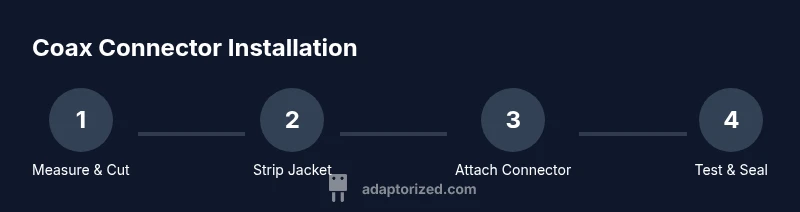
Measure and Cut Cable
Mark the desired length and cut the coax with a sharp cable cutter, ensuring a clean, square end. A straight cut helps the connector seat evenly and reduces the risk of gaps at the termination.
Tip: Use a ruler or calipers to verify the cut is perpendicular to the cable axis. - 2
Strip Outer Jacket
Apply the coax stripper to remove the outer jacket to the length specified by your connector, exposing the braid with no nicks in the shield. The shield should be intact and ready to fold back.
Tip: Work slowly and avoid nicking the dielectric or copper conductor. - 3
Expose Shield and Center Conductor
Fold or trim the shield as required by the connector type, and expose the proper length of the center conductor as specified. Ensure no stray strands contact the center conductor.
Tip: Check the connector’s stripped length specification before proceeding. - 4
Insert Cable into Connector
Slide any ferrule or sleeve onto the cable, then insert the prepared end into the connector until the conductor reaches the end and the dielectric sits flush against the connector.
Tip: Do not force the cable; if it won’t seat, re-check the stripped length. - 5
Crimp or Compress
Use the appropriate tool to crimp or compress the connector onto the cable, forming a tight, uniform bond. Ensure the tool depth matches the connector’s requirement.
Tip: Inspect the crimp/compression area for uniformity and avoid over-tightening. - 6
Test and Inspect
Perform a basic continuity check to confirm the center conductor and shield are connected. If available, perform an impedance test to verify no obvious reflections; visually inspect for shorts or damaged jacket.
Tip: If any reading looks off, rework the termination rather than forcing it.
Your Questions Answered
What is the best connector for coax on a DIY project?
For general home use, an F-type 75-ohm connector with RG-6 is common and cost-effective. Use the appropriate tool (crimp or compression) and follow the manufacturer’s instructions for seating depth.
For most DIY projects, start with an F-type connector for 75-ohm coax, and use the right crimp or compression tool to ensure a solid termination.
Can I reuse existing connectors after removing them?
Reusing connectors is generally not recommended because removal can deform the ferrule and seating geometry, which may lead to poor impedance matching. Replace with a new connector for best results.
Usually, it’s best to replace the connector rather than reuse it to ensure a reliable termination.
Do I need to solder the connector to coax?
Most crimp or compression coax connectors do not require soldering. Some specialized connectors may, but always follow the manufacturer’s instructions for your specific part.
Typically you don’t solder coax connectors; use the recommended crimp or compression method instead.
What if the shield is damaged?
If the shield is damaged, replace the cable or use a connector with a robust shield contact. A compromised shield can lead to interference and signal loss.
A damaged shield usually means you should replace the cable or end connector to maintain integrity.
How can I test the connection after installation?
Use a continuity tester to verify center conductor and shielding connectivity. If possible, perform a basic impedance check with RF test gear to ensure minimal reflections.
Test with a simple continuity check, and if you have gear, check impedance as well.
Will RG-59 work for high-frequency signals?
RG-59 can work for short runs but is not ideal for long runs or high-frequency transmissions; RG-6 is typically recommended for better performance.
RG-59 might work for short runs, but for higher frequencies and longer runs, choose RG-6.
Watch Video
What to Remember
- Match connector impedance to cable for best results.
- Strip and cut cleanly to avoid signal loss.
- Choose the correct crimp or compression method.
- Test continuity and, if possible, impedance after termination.
- Inspect shielding for damage and ensure a proper seal.