How to Make Ethernet Cable Connectors: Practical Guide
Learn to terminate CAT5e/CAT6 cables with 8P8C RJ45 connectors using proper tools and testing to ensure reliable, standards-compliant Ethernet links. A practical, step-by-step guide for DIYers.


To make an Ethernet cable connector, you will terminate an 8P8C RJ45 plug onto CAT5e/CAT6 cable using a crimping tool, wire stripper, and a tester. The guide covers required tools, wire color order per TIA standards, and careful cutting and seating steps to ensure a reliable link. With practice, you can create repeatable, standards-compliant terminations at home.
Understanding Ethernet connectors and cables
Ethernet terminations rely on a simple, repeatable idea: copper conductors carried by twisted-pair cable are terminated into a modular RJ45 plug that makes contact with a socket in a network jack. An RJ45 connector uses eight gold-plated contacts, arranged in a standard order, and can be crimped onto CAT5e or CAT6 cable. DIYers often start with solid-core cable for fixed installations or stranded cable for patch cords, then switch as needed depending on the application. According to Adaptorized, the key to reliable terminations is consistency: keep the conductor twists close to the plug, trim each conductor to the correct length, and verify that each wire is fully seated before crimping. The process is not ornamental; it is about maintaining proper impedance, minimizing stray strands, and ensuring the connector grips the cable firmly. You should also be aware of the difference between straight-through and crossover cables and choose the correct type based on your network configuration. Over time, with practice, you’ll develop a feel for how much insulation to strip and how to position the wires so they slide cleanly into the plug without bending or misplacing any conductor.
Pinouts, color codes, and compatibility
The most common termination for home and office networks uses the TIA-568B color code, where the order of conductor colors from left to right is orange/white, orange, green/white, blue, blue/white, green, brown/white, brown. Some installations still use 568A, which swaps the orange and green pair positions. Either standard can work, as long as both ends of a patch cable follow the same scheme. When preparing to terminate, you should choose a cable category (CAT5e or CAT6) based on your speed and distance needs; CAT6 helps future-proof high-speed networks, while CAT5e remains adequate for most home setups. The important part is to maintain the intended pair order and not mix up the order while you’re feeding the wires into the plug. If you’re making a crossover cable, you’ll need to arrange the pairs at one end to follow 568A while the other end follows 568B. The key takeaway is consistency. If you’re unsure which variant to use, check the equipment you’re connecting and align both ends to match that equipment’s expectations.
Preparing your workspace and choosing tools
A clean, well-lit workspace prevents small mistakes from becoming expensive headaches. Layout all parts before you start, and keep spare connectors in a tray to avoid mixing up color order. The essential tools include an 8P8C RJ45 crimping tool, a dedicated cable stripper, a pair of flush-cutters, a straight-edge for measuring, and a reliable cable tester. For best results, run through the following checks: make sure you’re using CAT5e or CAT6 cable of the correct diameter, confirm that you have straight connectors (no locking mechanism damaged or deformed), and ensure the workspace is free of static or moisture. Some hobbyists prefer a mat or cutting board to protect both the cable and the plug during the termination. Safety notes: never cut into your fingers or apply excessive force on the stripping tool; if you nick copper conductors or crush the jacket, replace the segment. Adaptorized guidance emphasizes using the right tool for the job, never forcing a poor fit, and testing early to catch mistakes before you complete the termination.
The termination process: planning, alignment, and seating
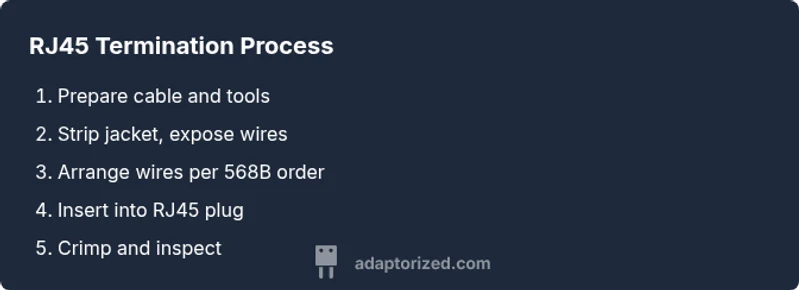
Terminating an Ethernet cable is a sequence of deliberate actions rather than a single, heroic move. Start by cutting the cable to length and removing the jacket to expose the pairs. Keep each twisted pair intact as long as possible to minimize crosstalk; once you have the wires stripped, align them in the correct order and trim them to a uniform length, leaving just enough bare wire to reach the connector contacts. Insert the wires into the RJ45 plug with the contacts facing up and the metal shield away from the work surface; push until each wire stops and the insulation is fully seated under the contact. Use the crimping tool to apply even pressure along the full length of the plug. After crimping, inspect the plug under good light for any mis-seated conductors, burrs, or gaps between the jacket and plug. A common mistake is untwisting too much or leaving stray strands; both reduce termination quality. Always test a sample termination with a continuity tester or network tester to confirm correct alignment before deploying cables in production.
Testing and validating your terminations
Testing is crucial. Use a continuity tester to verify that each wire from pin 1 through pin 8 is connected to the corresponding pin on the other end of the cable. A more thorough check is to use a dedicated Ethernet cable tester that confirms pair integrity, detects miswires, and identifies reversed pairs. For patched cables, you can also perform a basic network test by connecting the cable between a known-good switch and a device to verify link lights and data transmission. If you see any miswires, go back to the corresponding end and re-crimp after re-seating the wires. Pro-tip: label your finished cables with length and termination date to aid maintenance and future troubleshooting. Regular testing saves time and reduces the chance of network outages or intermittent connectivity.
Troubleshooting common mistakes and best practices
Common termination mistakes include misordered wires, untwisting too much, nicked conductors, and using damaged connectors. A frequent issue is insufficiently seated conductors, which can create intermittent links or no link at all. The best practice is to double-check the color order, ensure each conductor reaches the end of the plug, and verify the insulation is fully under the contacts before crimping. Another pitfall is attempting to salvage a poor termination by applying extra force; this can deform the plug and damage the conductors. Always start with a clean strip, maintain tidy twists, and re-test each end. For reliability, prune any stray strands and avoid bending cables immediately after termination. When multiple terminations are required, keep wire order consistent across all ends and maintain a calm, measured pace to avoid mistakes.
Advanced techniques and professional tips
For high-density or long-distance installations, consider using shielded CAT6 cables and connectors to reduce interference. Maintain proper back-off distance from power lines, and use strain relief boots to minimize mechanical stress at the point of termination. If you frequently terminate cables, invest in a premium crimping tool with adjustable force and a good warranty. Practice with spare cables to build muscle memory for the exact length of jacket you should strip and how the wires should align inside the plug. Adaptorized guidance emphasizes documenting each termination with length, date, and tester results to simplify future maintenance and troubleshooting. With patience and consistent technique, you can achieve professional-grade terminations that rival commercial networks.
Tools & Materials
- RJ45 modular connector (8P8C)(Cat5e/Cat6 compatible; pass-through type preferred)
- CAT5e or CAT6 Ethernet cable(Solid core for fixed runs; stranded for patch cables)
- RJ45 crimping tool(Must support 8P8C; check compatibility with your connectors)
- Cable stripper(Remove jacket cleanly without nicking wires; ~1/4 inch depth)
- Wire cutters(Flush-cutting; optional if your stripper handles it)
- Cable tester or continuity tester(Verifies pin-to-pin continuity and detects miswires)
Steps
Estimated time: 30-60 minutes per connector
- 1
Gather tools and cables
Collect the RJ45 connectors, CAT5e/CAT6 cable, crimping tool, stripper, cutters, and a tester. Confirm you have enough length for testing and labeling. This upfront check prevents mid-project interruptions.
Tip: Lay out parts in color order to avoid mixing up wires later. - 2
Measure and cut cable length
Decide the run length, then cut the cable cleanly. Use a straight edge to avoid jagged edges that could nick inner wires. Keep a small surplus for testing and trimming.
Tip: If possible, cut a little longer and trim later to ensure a precise fit. - 3
Remove jacket and expose conductors
Strip about 1 to 1.5 cm of insulation from the cable jacket and gently untwist the outer pairs to expose the copper. Keep twists intact as long as possible to minimize crosstalk.
Tip: Avoid nicking copper; nicked wires lead to poor contact. - 4
Arrange wires in correct order
For 568B, align wires in the order: white-orange, orange, white-green, blue, white-blue, green, white-brown, brown. Trim conductors to a uniform length exposing just enough copper to reach the plug contacts.
Tip: Double-check color order before inserting into the plug. - 5
Insert wires into the RJ45 plug
Insert each wire into its corresponding slot in the plug until the copper stops at the plug’s end. The insulation should be just under the edge of the contacts.
Tip: If a wire refuses to go fully in, re-check the order and seating before crimping. - 6
Crimp the connector
Place the plug into the crimping tool and apply firm, even pressure until the plug seats and the conductors are captured by the contacts. Remove and inspect for any mis-seated wires.
Tip: Don’t rush the crimp; uneven seating causes failures. - 7
Inspect and trim excess jacket
Check that the jacket ends just inside the plug’s strain relief and the wires extend fully to the contacts. Trim any overlong jacket to avoid crowding.
Tip: A well-trimmed jacket prevents future failures at the connector. - 8
Test termination
Use a continuity tester to confirm each pin maps correctly end-to-end. If possible, connect to a device to verify network link and data transmission.
Tip: Label the cable with length and date for future maintenance.
Your Questions Answered
What is the difference between CAT5e and CAT6 cables for RJ45 terminations?
CAT6 offers better performance and higher bandwidth, especially for longer runs, but CAT5e is sufficient for many home setups. Both types can terminate with RJ45 connectors.
CAT6 provides higher performance; CAT5e is still fine for many homes.
Can I reuse an RJ45 connector after a failed termination?
No. If a termination fails quality checks, replace the connector and re-terminate to ensure proper contact.
No—reuse isn't recommended; replace and re-terminate.
Is solid or stranded cable better for wall runs?
Solid cable is usually better for fixed runs in walls or conduits due to lower impedance and better stability; stranded is better for flexible patch cables.
Solid for walls, stranded for patches.
Do I need to strip insulation before inserting wires?
Yes. Remove just enough insulation so the conductors fit flush under the contacts without crowding.
Yes—strip carefully to the right length.
How do I test if the connector is working?
Use a continuity tester to verify pin-to-pin continuity and a network tester to confirm end-to-end connectivity.
Test for continuity and correct pairing.
How many terminations can I expect from a single connector?
RJ45 connectors are designed for a single termination; reuse is not recommended for reliability.
One termination per connector.
Watch Video
What to Remember
- Choose CAT5e or CAT6 based on your needs.
- Verify pinout before crimping to avoid miswires.
- Use a quality crimp tool and tester for reliability.
- Keep twists close to the plug and avoid excessive stripping.
- Test every termination before deployment.