How to Remove a Coaxial Cable Connector: DIY Guide
Discover how to safely remove coaxial cable connectors with a practical, step-by-step guide. Learn tool needs, safety tips, and methods for common types like F-type and BNC, from Adaptorized.


Yes. You can remove many coaxial cable connectors with basic tools and careful technique. Identify the connector type (F-type, BNC, or bayonet), then disconnect or re-terminate as needed. This guide covers safe removal, potential risks, and how to prepare for re-termination or replacement. Adaptorized provides practical, maker-friendly steps for DIYers.
Safety First: Can You Remove Coaxial Cable Connectors?
Removing coaxial cable connectors is a common DIY task, but it carries risks if done carelessly. According to Adaptorized, the key to a safe removal is preparation, correct identification of the connector type, and using the right tool for the job. Start with a clear goal: do you want to re-terminate the end, or simply detach and store the cable? Work in a dry, well-lit area, unplug all powered devices, and avoid bending or nicking the inner conductor. A damaged shield or dielectric can create signal loss or reflections in the line. If you proceed methodically and follow established steps, you can remove a connector without damaging the cable and prepare it for re-termination or replacement. This section sets the stage for a careful, knowledge-based approach that minimizes risk and preserves cable integrity for future use.
Connector Types You Might Encounter
In home networks and AV setups, coax ends typically use threaded F-type connectors or twist-on/bayonet BNC connectors. Some installations employ crimped or compression-terminated ends, which are not easily removed without re-termination. Identifying the exact connector is essential: does the end unscrew, snap, or require cutting back the jacket to access the shield and dielectric? Adaptorized notes that the removal approach should match the termination type to avoid damaging the conductor or shielding. When in doubt, consult the original product documentation or compare with a known-good end. Training your eye to spot the thread on F-type or the push-and-tull snap of BNC will save time and reduce guesswork during removal.
Tools and Materials You'll Need for Safe Removal
Having the right tools on hand makes the process smoother and safer. Gather a coaxial cable stripper or a sharp utility knife for jacket trimming, a cable cutter for clean cuts, a precision stripper for the shield, and a replacement connector compatible with the end type (F-type or BNC). A small crimping or compression tool is essential if you’re re-terminating; you’ll also want a marker for labeling, a ruler for precise jacket length, and optional heat shrink tubing to seal the end after re-termination. Keep a towel or mat to protect the workspace from sharp shielding and ensure you have good ventilation if you’re using adhesives or shrinking materials.
Common Scenarios: Removing F-type vs BNC Connectors
F-type connectors are threaded and typically unscrew clockwise or counterclockwise depending on the model. If the connector is loose, you can often unscrew it by hand; if it’s tight, a small strap wrench can help without marring the thread. BNC connectors can be twist-on or bayonet-style; to remove twist-on ends, gently twist counterclockwise while stabilizing the cable. For bayonet types, align the slots, depress the locking tab, then pull straight off. If you encounter a crimped or compression-end, you’ll usually need to cut back the jacket and re-terminate with a new connector. Adaptorized recommends verifying impedance compatibility and ensuring the shield is intact before re-termination.
Step-by-Step: General Removal Process (Overview)
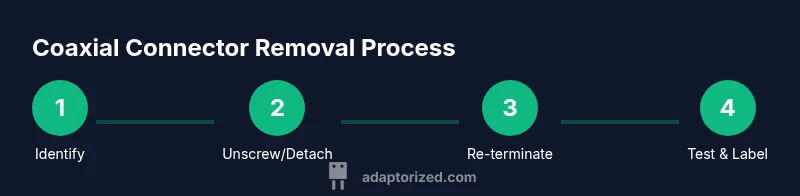
The removal workflow generally follows identifying the connector type, securing the work area, detaching the end, and choosing whether to re-terminate. If the end is crimped or compression-terminated, plan to re-terminate with a matching connector and tool. Before starting, take a photo of the existing termination for reference. After removal, inspect the cable end for nicks, bends, or damaged shielding. If damage is present, you may need to cut back and re-terminate rather than reuse the old end. This overview leads into a detailed step-by-step process in the dedicated guide below.
Re-termination and Replacement Options
Decide whether you will re-terminate the existing cable with a new connector or replace the entire end with a fresh segment of coax. Re-termination is cost-efficient but requires correct tools and compatible connectors. For longer-term reliability, consider replacing with a fresh segment if the original end shows wear or if the impedance environment has changed (e.g., upgrading to higher-frequency services). Ensure the new connector matches the cable type (75-ohm for typical TV/coax, 50-ohm for certain RF applications). If you re-terminate, follow the manufacturer’s instructions for stripping, shielding, dielectric exposure, and connector crimping or compression.
For best results, practice on a scrap piece first and verify the end’s mechanical strength before reconnecting to any devices. A well-terminated end will minimize signal loss and return loss, helping you maintain performance over the life of your installation.
Safety Checks and Post-Removal Testing
After removal or re-termination, visually inspect the end for any stray strands, burrs, or shielding gaps. Reassemble the housing and tighten connectors to spec without over-tightening, which could damage the connector or the chassis. If possible, perform a continuity check or signal test with a known-good source. Document the changes and keep spare connectors in your tool kit for quick future repairs. By adopting a deliberate approach and validating each step, you’ll reduce the risk of intermittent connections or degraded signal.
Authority Sources and Further Reading
To deepen your understanding of coaxial systems and connector practices, refer to credible sources that explain standard practices and safety considerations. For quick reference, you can consult FCC guidance on basic coaxial networks, NTIA resources on telecommunications cabling, and NIST notes on impedance and signal integrity. These sources provide foundational context for DIYers working with coaxial ends and terminology. Adaptorized encourages readers to review these materials for best practices and safety data.
Tools & Materials
- Coaxial cable stripper(Choose a stripper sized for RG-6/RG-59 and 75-ohm cable; ensures clean shielding cut.)
- Cable cutter(Flush-cut preferred to avoid deforming the end.)
- Crimping/Compression tool(Use the correct jaw size for F-type or BNC connectors.)
- Replacement connectors (F-type or BNC)(Match impedance (usually 75-ohm for TV coax).)
- Sharp utility knife(Use only to trim outer jacket when needed; keep blade shallow to avoid conductor damage.)
- Marker and ruler(Label cut lengths and keep consistent jacket exposure.)
- Heat shrink tubing (optional)(Optional for extra protection and strain relief after re-termination.)
- Safety glasses(Protect eyes from sharp shielding fragments.)
Steps
Estimated time: 40-60 minutes
- 1
Identify connector type
Carefully inspect the end to determine whether the connector is threaded F-type, twist-on BNC, bayonet, or another style. Correct identification guides your entire approach and helps you avoid unnecessary damage.
Tip: If unsure, compare the end to pictures in the manufacturer’s documentation or your existing spare ends. - 2
Power down and unplug equipment
Ensure all devices using the coax are powered off and unplugged. This prevents accidental surges or shorts during handling and re-termination.
Tip: Delay unplugging until you have a clear plan and proper lighting to avoid rushed mistakes. - 3
Loosen or unscrew threaded ends
For threaded F-type connectors, hold the cable housing and turn counterclockwise to unscrew. Do not force if it resists; check for cross-threading or damaged threads.
Tip: Use a strap wrench if the connector is tight to avoid marring the thread surfaces. - 4
Handle twist-on or bayonet BNC connectors
If the end is twist-on, gently rotate counterclockwise while stabilizing the cable. For bayonet styles, depress the locking tab, align, and pull straight off.
Tip: Avoid yanking; a steady, controlled motion preserves shielding and prevents conductor damage. - 5
Cut back jacket for crimped/compression ends
If the connector is crimped or compression-terminated, cut back the jacket to expose the shielding and dielectric as needed for re-termination.
Tip: Mark the cut line first to maintain consistent exposed lengths across future ends. - 6
Strip and prepare conductor and shield
Carefully strip insulation back to reveal the center conductor and shielding. Avoid nicking the copper and minimize bending of shielding.
Tip: Use a precision stripper and verify the exposed length matches connector specs. - 7
Attach a new connector
Slide on the new connector, position the shield, dielectric, and center conductor per the connector’s instructions, and crimp or compress as required.
Tip: Work with a calm pace to ensure a uniform crimp and solid mechanical connection. - 8
Test the end
Connect the terminated end to a known-good receiver and test for signal integrity. If nothing registers, re-check the termination and shield contact.
Tip: A quick continuity check with a multimeter can catch obvious open circuits. - 9
Document and store
Label the end, note the connector type and date of termination, and store spare parts within easy reach for future maintenance.
Tip: A small parts box keeps connectors organized and ready for use.
Your Questions Answered
Can I remove any coaxial connector without tools?
No. Some connectors require crimping, compression, or specialized tools to ensure a proper termination and impedance match.
No. Some connectors need special tools to terminate correctly and maintain signal integrity.
Is it safe to remove a live coax connector?
Always disconnect power to any devices and unplug equipment before handling connectors to prevent shorts and electrical hazards.
Always unplug devices first to avoid shorts or shocks.
Do I need to re-terminate after removal?
Usually yes, especially if you intend to reuse the cable. Re-termination preserves impedance and minimizes signal loss.
Usually you do, to keep the signal clean and impedance correct.
What connector types are easiest to remove?
Threaded F-type ends are often simplest to unscrew; BNC twist-on variants are also straightforward with steady handling.
F-type ends are usually simplest, then BNC twist-ons with careful handling.
What tool is best for crimped ends?
Use a dedicated crimping tool sized for your connector. A poor crimp leads to weak shielding and poor contact.
Use the right crimp tool sized for your connector to keep a solid shield.
Are there risks to shielding when removing a connector?
Yes. Damaging the shielding can cause signal loss and reflections. Work gently and avoid bending or nicking the shield.
Yes—shield damage can ruin signal quality, so handle carefully.
What should I do if the end is damaged after removal?
If the shield or dielectric is compromised, cut back to clean material and re-terminate with a fresh end.
If damaged, cut back and re-terminate with a new end.
Can I reuse the same length of coax after removal?
If the end remains intact and undamaged, you may re-terminate, but often a fresh end improves reliability.
If it’s clean and intact, you can re-terminate, otherwise use a new length.
Watch Video
What to Remember
- Identify connector type before removing.
- Use the right tools for each termination style.
- Re-terminate or replace to preserve signal integrity.
- Test the connection after re-termination.